
Introducing Face-to-Face Mode — Put the Phone Down Between You

Today we're shipping Face-to-Face Mode on iOS — a new way to use Whisperr when you're sitting across the table from someone who doesn't share your language.
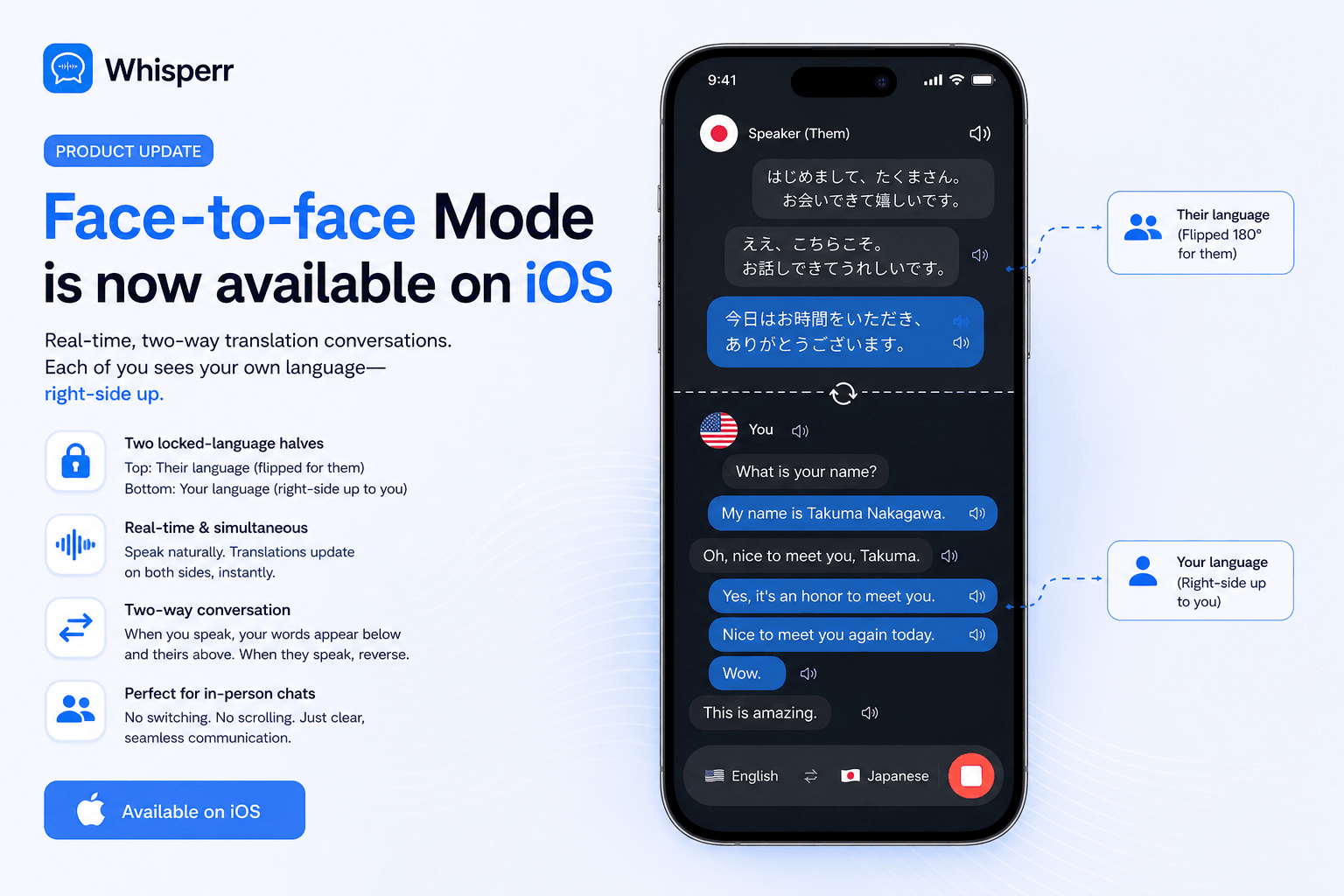
Turn it on, lay your phone flat between you, and the screen splits into two halves. Your side reads right-side up to you. Their side reads right-side up to them — because Whisperr flips it 180°. You both see the live conversation in your own language at the same time, on the same screen.
No more passing the phone back and forth. No more reading upside down. No more "wait, which line was for me?"
What's new
When Face-to-Face Mode is on, Whisperr splits the screen into two locked-language halves:
- Bottom half — your language (right-side up to you)
- Top half — their language (right-side up to them, because it's flipped 180°)
Each half is locked to a single language, so neither of you has to scan past lines you can't read. When you speak, your transcription appears on your side and the translation appears on theirs. When they speak, the reverse. Both sides update in real time, simultaneously.
The phone becomes a shared surface instead of a "yours" device. Drop it between two coffees on the table, and both people read.
The problems it solves
Face-to-face translation on a phone has always been awkward. Until now, the options were:
- Pass the phone back and forth every time someone speaks. Slow. Breaks the rhythm of the conversation. Easy to miss who's talking.
- Lay the phone flat and have one person read upside down, craning over the screen and hoping the captions don't scroll past. The other person feels like a spectator.
- Use a single feed mixing both languages — workable, but each person has to visually filter past the lines that aren't for them, on every update. Cognitive load on both sides.
Face-to-Face Mode replaces all three. The phone stays flat between you. Each person sees their own language, oriented for them, on their half of the screen. Neither person filters anything. The feed scrolls naturally on each side as the conversation moves.
It's the closest thing to having an interpreter sitting at the table — except the interpreter is a phone, the cost is a Whisperr subscription, and there's no third human in the conversation.
What it's perfect for
This mode unlocks a category of in-person scenarios where pulling out an app and passing it around always felt clumsy:
- Restaurants and cafés — order, recommend a dish, ask about ingredients, chat with the staff. Drop the phone between you and the server.
- Hotel front desks and concierge — check in, ask for directions, sort out a problem. The agent reads their side, you read yours.
- Doctor's appointments and pharmacies — describe a symptom, understand a dosage, ask follow-up questions. Both sides read every word, no interpreter needed for routine visits.
- Retail and customer service — try on shoes, ask about a return, negotiate a price at a market stall.
- Meeting a partner's family for the first time — sit down at the dinner table with the phone in the middle and actually have a real conversation.
- Real estate showings, language exchange meetups, casual friend-of-a-friend introductions — anywhere the conversation is two people, in person, in different languages.
If you've ever held up a phone to someone's face hoping they'd read your translation, this is the upgrade.
How to turn it on
- Open the Whisperr iOS app (update to the latest version)
- Go to Settings
- Turn on Split Screen View
- Turn on Face-to-Face Mode (appears right under Split Screen View)
- Pick your source and target languages, tap Start, and lay the phone flat between you and the other person
Both halves of the screen will update in real time as either of you speaks. Each person reads their language, right-side up, from their side of the table.
To switch back to a single-feed view, just toggle Face-to-Face Mode (or Split Screen View) off in Settings.
How it fits with the rest of Whisperr
Face-to-Face Mode joins the existing capture and display modes — it's not a replacement, it's the right tool for one specific situation:
Mode | Best for |
|---|---|
Default view | Personal listening — you're following a conversation, lecture, or video for yourself |
Floating Subtitles | Watching another app (YouTube, Netflix, FaceTime) with captions on top |
Speech Mode | Hands-free listening — the translation read aloud to you |
Broadcast Mode | One speaker, many viewers reading on their own devices |
Face-to-Face Mode (new) | Two people, one phone on the table between you, both reading |
Try it on your next conversation
Update the Whisperr iOS app, turn on Split Screen View and Face-to-Face Mode, and the next time you're talking to someone in a different language — at a counter, at a table, at a desk — put the phone down between you. Both sides read live, in their own language, at the same time.
It changes what "using a translation app" feels like. The phone stops being yours. The conversation belongs to both of you.
Questions or feedback? Reach out via support — we'd love to hear how you're using it.