Whisperr vs ChatGPT Advanced Voice Mode: An Honest Comparison for Live Voice Translation

If you've been using ChatGPT Advanced Voice Mode for translation and wondering whether you actually need a separate tool — or if you're a Whisperr user and curious how it stacks up against the default AI assistant millions of people already have on their phone — this post is for you. We'll go through what each one does well, where each one falls short, and which scenarios point clearly to one over the other.
We're going to try to be objective. ChatGPT Advanced Voice Mode has genuine strengths Whisperr doesn't try to compete with, and there are scenarios where it's the better pick.
At a glance
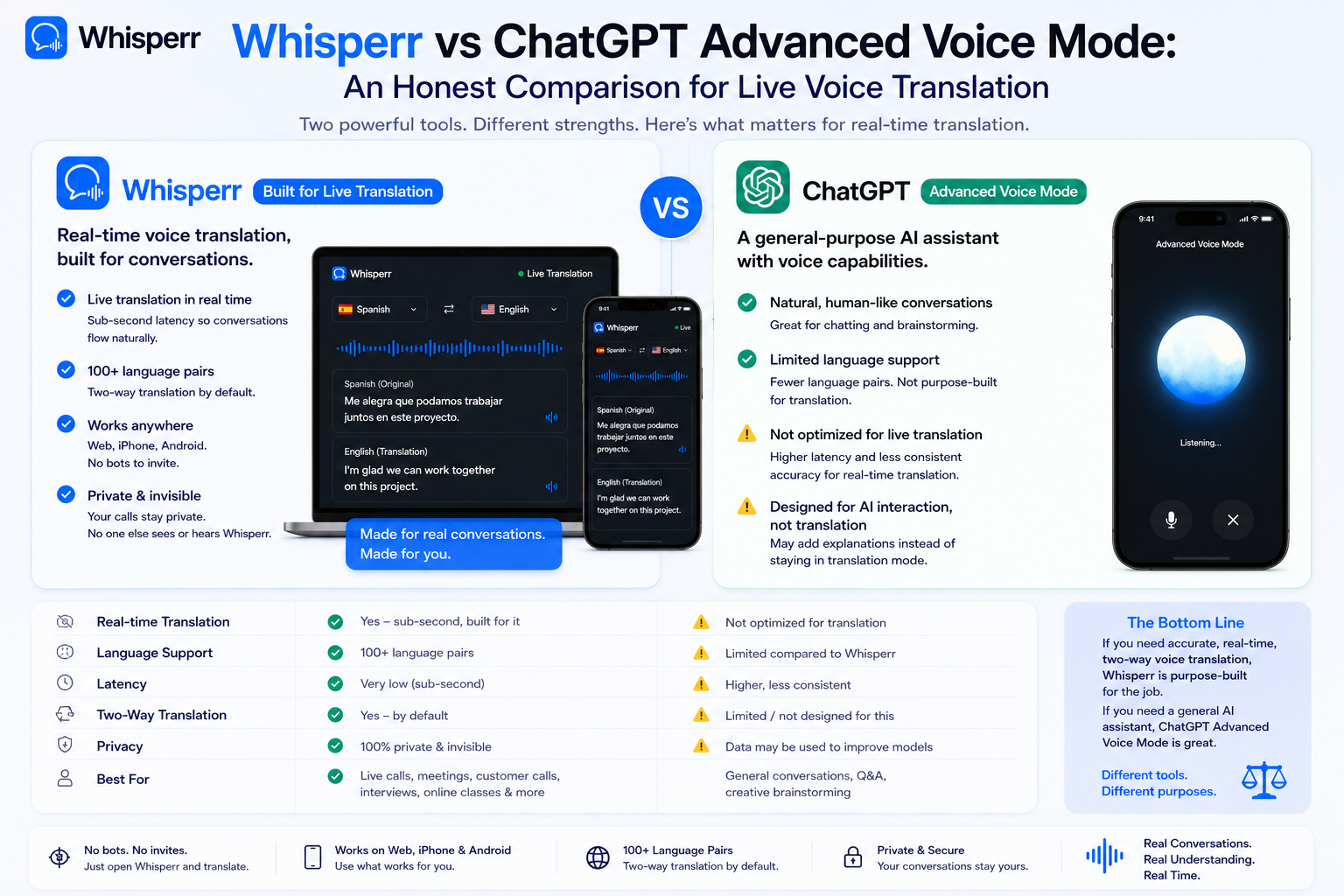
| ChatGPT Advanced Voice Mode | Whisperr |
|---|---|---|
Primary output | Spoken AI reply (audio) | Live on-screen captions (text), with optional spoken audio output |
Continuous translation | Yes (since June 2025) | Yes, line-by-line |
Languages | ~50 | 100+ pairs, including the long tail |
Platforms | iOS, Android, desktop web (translation mode best on mobile) | iPhone app, Android app, web app on Mac/Windows |
Audio sources | Phone microphone only | Microphone, browser tab audio, YouTube/Instagram/TikTok in-app, system audio |
Floating subtitles overlay | No | Yes — iOS and Android Picture-in-Picture, desktop floating window |
Broadcast / share to audience | No | Yes — generates a public room URL anyone can open |
Face-to-face mode (flipped screen) | No | Yes |
Speech mode | Yes (speech-to-speech) | Yes |
Show transcription only / translation only | No (audio only by default) | Yes |
Adjustable font size | No | Yes |
Works during Zoom / Teams / Meet / Webex | Only by playing audio out loud through a speaker | Yes — captures meeting tab audio directly |
Works on YouTube Live, Instagram Live, TikTok Live | No | Yes |
Conversational AI features (ask follow-ups) | Yes | No (it's a translator, not a chatbot) |
Daily usage limits | Yes — Free 2hrs/day; Plus has GPT-4o limits | Single subscription, no per-use cap |
Data used for AI training | Yes, unless opted out | No — GDPR compliant; not permanently stored |
Free tier | Yes (GPT-4o mini, 2 hours/day) | Free for one-off use |
There's a lot to unpack in that table. Let's go.
What ChatGPT Advanced Voice Mode does well
1. The voice sounds genuinely human
This is the headline strength. Advanced Voice Mode is powered by GPT-4o, which natively processes audio in and out — meaning your speech goes straight to a multimodal model and the translated voice comes back without a separate text-to-speech step bolted on. The result is a voice with realistic pacing, emotional inflection, and conversational pauses. For a casual scenario — a Spanish speaker at a café, a Japanese taxi driver — being able to hear a natural-sounding translation rather than reading captions is a real advantage.
2. Continuous translation mode (since June 2025)
OpenAI shipped a meaningful upgrade in mid-2025: tell ChatGPT to translate between two languages, and it'll stay in translation mode until you tell it to stop or switch. Before that, it had a habit of slipping into language-tutor mode or breaking out of translation to ask follow-up questions. It's now much closer to a true bidirectional interpreter for short conversations.
3. Speech-to-speech, hands-free
You can run Advanced Voice Mode without looking at your phone. For drivers, cooks, people whose hands are full, or anyone in a situation where staring at a screen is awkward, getting the translation spoken aloud is the right design choice. Whisperr also supports speech output, but ChatGPT's voice quality and naturalness are the current high-water mark.
4. Wide language coverage for the common cases
Over 50 languages are supported, including English, Spanish, French, German, Chinese, Japanese, Hindi, and other major world languages. For the most-spoken languages, accuracy is good and the speech sounds native.
5. It's already on your phone
The ChatGPT app is installed by hundreds of millions of people. If you already pay for ChatGPT Plus, Team, Enterprise, or Edu, Advanced Voice Mode (including translation) is included — no separate purchase, no extra signup. The barrier to trying it is essentially zero.
6. Excellent for language learning and pronunciation practice
Translation is just one of many use cases ChatGPT Voice handles well. It's a strong conversational partner for practicing a language, getting pronunciation feedback, and roleplaying scenarios — adjacent to translation, but distinct from it. Whisperr doesn't try to do this; we're a translator, not a tutor.
7. You can ask questions, not just translate
You can break out of translation to ask follow-up questions ("what does this idiom mean?", "how would I say this more formally?"). That conversational flexibility is genuinely useful when you're learning a language alongside trying to communicate.
What ChatGPT Advanced Voice Mode doesn't do well
1. No on-screen captions during translation
This is the biggest gap, and it's the gap Whisperr was built to fill. ChatGPT Voice gives you audio back; it does not display synchronized translated captions as the other person speaks. There's a transcript available after a voice session, but during the conversation, you're listening — not reading. Users have been requesting a real-time subtitle feature on OpenAI's developer forums for over a year and it hasn't shipped.
This matters because there are large categories of translation jobs where reading beats listening:
- Watching a foreign-language livestream — you can't have ChatGPT's voice talking over the stream's audio.
- Following a multi-person meeting — you need a continuous caption stream, not a turn-based interpreter.
- Public or noisy environments — playing AI-generated audio out loud is awkward and impractical.
- Anyone hard of hearing — captions are the accessibility need, not more audio.
- Long sessions — reading captions is much less fatiguing than constant audio interpretation.
2. Can only listen to your phone's microphone
ChatGPT Voice has no way to hear audio from another app. If you're trying to follow a Zoom call, a Teams meeting, a YouTube video, a Spanish news livestream, or a Korean podcast playing on your laptop, ChatGPT Voice can only pick that up if you point your phone's mic at the speakers — and even then, you're stuck with whatever audio quality your room provides plus all the ambient noise of your environment. That's a very lossy way to feed an AI model.
Whisperr captures audio at the system level — directly from the browser tab, directly from the YouTube/Instagram/TikTok app, or directly from your microphone — without any "play it on a speaker and hope for the best" workaround.
3. No way to broadcast translations to other people
ChatGPT Voice is a one-person experience. If you're presenting in your native language to an audience that doesn't speak it, there's no way to share what ChatGPT is hearing with the people you're talking to. Whisperr's Broadcast mode generates a public room URL — your audience opens it in their browser, on any device, and reads live translated captions while you speak. No install, no signup, no permissions. One subscription covers however many people open the link.
4. Daily usage limits
Even paid subscribers run into limits. Free users get about 2 hours per day of voice on GPT-4o mini. Plus subscribers get more, but heavy users still hit daily caps and get downgraded to a less capable model for the rest of the day. Pro tier ($200/month) is closer to unlimited but priced for power users. For someone running translation across a workday — a full conference, a long meeting, a livestream binge — these caps matter.
5. Hallucinations are acknowledged by OpenAI
OpenAI's own release notes for the upgraded Advanced Voice Mode call out occasional "audio quality decreases" and "infrequent hallucinations that produce unintended sounds, like ads or just gibberish." That's a different kind of failure mode than what you get from a dedicated speech-to-text plus translation pipeline. When an LLM hallucinates a translation, it can produce something fluent-sounding but wrong — which is harder to catch than an obvious garbled output.
6. Mode-switching bugs at launch (and still occasional)
Early users of the translation feature reported that ChatGPT would sometimes switch back to language-learner mode or chat mode mid-conversation, or simply stay silent. OpenAI says it's actively working on these. They've improved a lot, but it's still a possibility on any given session.
7. No multi-speaker handling
ChatGPT Voice processes one mic stream. It doesn't differentiate speakers or label who said what. If you're in a meeting with three or four people speaking different languages, it can't tell you who said which line — and the conversation tends to outpace its turn-taking.
8. No customization for translation specifically
ChatGPT Voice's interface is one big "talk to the AI" experience. There's no way to:
- Adjust caption font size for readability
- Show only the source transcription or only the target translation
- Flip half the screen so a person across the table reads upright
- Pin captions on top of another app
- Toggle between display modes for different scenarios
That's because translation is one feature among hundreds. Whisperr's whole UI is designed around the translation job.
9. Privacy and data handling
ChatGPT voice conversations are used for model training unless you opt out in settings or use the API. Audio and video clips from voice chats are stored alongside transcripts in your chat history. For regulated industries — healthcare, finance, legal, government — this is a non-starter without enterprise-tier guarantees. Whisperr is GDPR compliant; audio is processed in real time and isn't permanently stored, and any saved transcripts are under your account's control and deletable.
10. Not built for long, continuous sessions
ChatGPT Voice is shaped for short, conversational interactions. Run it for an hour and you'll often hit limits, get downgraded, or run into interruption issues where the model thinks you're done speaking during a natural pause. Translation jobs — a webinar, a 90-minute interview, a film screening, a full-day conference — call for a tool designed for sustained operation.
What Whisperr does well
This is the part of the post where we should disclose our hand: this is Whisperr's blog. We'll keep it factual.
Live captions from any audio source
The core thing: Whisperr listens to audio coming from your microphone (in-person conversations), from a browser tab (Zoom, Teams, Meet, Webex, webinars, YouTube videos, anything playing in Chrome / Edge / Firefox), or directly from the YouTube, Instagram, and TikTok apps on iPhone and Android via Picture-in-Picture. Wherever the audio is, Whisperr can read it.
Captions appear side by side — source language on top, target language below — line by line, timestamped. Latency is sub-second.
Floating subtitles
Whisperr's floating subtitle overlay sits on top of whatever app you're using. On iPhone and Android it uses the system's Picture-in-Picture feature, which means no Accessibility Service permission is required (a permission a translation tool really shouldn't be asking for). On desktop, the floating window stays pinned over your Zoom call, your YouTube video, or your Teams meeting so you don't have to shuffle windows.
Broadcast mode
Switch to Broadcast mode, tap the mic, and Whisperr generates a shareable public room URL. Anyone — colleagues, an audience, a remote panel — opens the link in any browser and reads live translated captions of what you're saying. No install for them, no signup, no microphone permission. One subscription covers everyone who joins.
Face-to-face mode
For in-person, two-person conversations, Whisperr can flip half the screen 180° so the person across the table from you can read the translation right-side up on their side of the phone. You both stare at the same device, both read upright, neither of you has to crane your neck. It's the cleanest way to translate a passport conversation, a restaurant order, a quick exchange with someone who doesn't speak your language.
Speech mode
When reading isn't ideal, Whisperr can speak translations aloud — useful when you need to keep your eyes on the person you're talking with or your hands are busy.
Transcription-only or translation-only display
Sometimes you want both columns. Sometimes you want to clean things up and see only the source transcription (for someone learning a language) or only the translated target (for the cleanest reading experience). Whisperr lets you switch between display modes.
Adjustable font size
Captions need to be readable from the distance you're reading them. Whisperr lets you scale text up or down based on where the phone sits, who's reading, and how much screen real estate you want each line to take.
100+ language pairs including the long tail
Most translation tools cover the top 30 languages well and degrade quickly on everything else. Whisperr supports 100+ source/target combinations — Vietnamese ↔ English, Indonesian ↔ English, Hindi ↔ English, Polish ↔ English, Korean ↔ English, Arabic ↔ English, plus East Asian and major regional dialects.
GDPR compliant, audio not permanently stored
Audio is processed in real time. Nothing's kept around unless you save the transcript yourself, and anything you do save is under your account's control and deletable at any time.
When ChatGPT Advanced Voice Mode is the right pick
Be honest about this:
- A short, casual, in-person conversation where the natural-sounding spoken translation is genuinely useful — chatting with a Spanish speaker at a café, getting directions in Tokyo, ordering food in Italian.
- Language practice — pronunciation feedback, conversational drills, vocabulary work.
- You want to also ask the AI questions about what was just said — "what does that idiom mean?", "how would I respond politely?". Whisperr is a translator, not a chatbot; ChatGPT is both.
- Hands-free, eyes-free scenarios — driving, cooking, walking — where reading captions isn't viable and the spoken translation is exactly what you need.
- You already pay for ChatGPT Plus and want to test what it can do before evaluating another tool.
For these jobs, ChatGPT Advanced Voice Mode is genuinely good. We'd point you there.
When Whisperr is the right pick
- You need to read, not listen. Anywhere captions beat audio: noisy environments, accessibility, multi-person meetings, livestreams, anything happening on a screen.
- The audio is coming from an app or website, not from a person speaking next to you. Zoom, Teams, Meet, Webex, YouTube, Instagram Live, TikTok Live, podcasts, foreign news streams, paywalled livestreams — Whisperr captures the audio directly. ChatGPT Voice can't.
- You're presenting and want your audience to follow along. Broadcast mode, one URL, everyone reads in their own language. No install on their end.
- Multi-person meetings. Even with continuous translation mode, ChatGPT Voice doesn't handle multi-speaker meetings well — Whisperr was designed for them.
- Long sessions. A full conference, a 90-minute interview, a multi-hour livestream binge — no daily caps.
- Languages outside the top 30. Cantonese, Tagalog, Polish, Vietnamese, Indonesian, Lao — Whisperr covers the long tail.
- Regulated industries. GDPR compliance, no model training on your audio, captions not permanently stored unless you opt in.
- In-person, two-person conversation with the face-to-face flip. When both of you want to read upright from the same device.
A decision tree
If you only have 30 seconds to decide:
- Hearing a single live person, hands-free, casual? → ChatGPT Advanced Voice Mode.
- Need captions you can read while keeping your eyes on the speaker, the screen, or the road? → Whisperr.
- Audio coming from Zoom, Teams, Meet, Webex, a webinar, or a video call? → Whisperr (ChatGPT can't capture tab audio).
- Watching YouTube Live, Instagram Live, TikTok Live, Twitch, or any livestream? → Whisperr.
- Translating for an audience, not just yourself? → Whisperr (Broadcast mode).
- Practicing a language, asking the AI about what was said, or wanting back-and-forth chat? → ChatGPT Advanced Voice Mode.
- You need this to run all day without hitting daily limits or being downgraded to a less capable model? → Whisperr.
Can you use both?
Yes — and a lot of people probably should. ChatGPT Advanced Voice Mode is excellent at the casual in-person conversation case and at language practice. Whisperr is built for everything else live voice translation involves — meetings, livestreams, broadcasting, accessibility, long sessions, the long tail of languages.
If you find yourself reaching for ChatGPT Voice once or twice a week to chat with someone in person, and another tool every time there's a meeting or video, that's the natural split.
Try Whisperr on your next meeting, livestream, or call
If you've been using ChatGPT Voice for translation and running into the gaps above — no captions, no tab audio, no broadcasting, no floating subtitles, daily limits, the long-tail languages it doesn't handle well — Whisperr was built for exactly that shape of problem.
Start it on iPhone App, Android App, or Web App →
Copyright © 2026 Whisperr. All Rights Reserved.