Whisperr vs Timekettle Earbuds (M3, W4, W4 Pro, X1): An Honest 2026 Comparison

You're sitting in a Tokyo conference room. A Spanish-speaking client just joined the Zoom call from Madrid. Your team lead is presenting in English on a laptop, and your translator-of-choice has to keep up with all of it without making the conversation feel like a hostage negotiation.
There are two very different ways the market answers this. One says put it on the screen you're already looking at. The other says put it in an earbud. They both work. But they're not interchangeable, and most "best live translator" listicles flatten that distinction by lumping them together. This is a closer look at where each one is genuinely better, and where the marketing oversells what's actually on offer.
What each one is built for
Whisperr starts from the assumption that the screen is the natural surface for translation. You read translated captions on the device you're already using — your iPhone, your Mac, your browser tab. Whisperr's whole feature set leans into that: floating subtitle overlays, font-size controls, broadcast rooms (one person captures audio, many people read along on their own phones), a face-to-face mode that flips the screen for the person across the table, and a "translation only" view that hides the source transcription when you just want clean output.
Timekettle starts from the opposite assumption: that translation should arrive in your ear, not on your screen. The W4 and W4 Pro are physical earbuds. The flagship use case is two people sitting across from each other, each wearing one earbud, speaking their own language and hearing the other person's words translated. Timekettle's companion app and the X1 hub do display subtitles, but the heart of the product is audio in your ear from dedicated hardware — bone-conduction sensors, triple microphones, vector noise cancellation.
These aren't the same product with different polish. They're different categories solving overlapping use cases.
Side-by-side at a glance
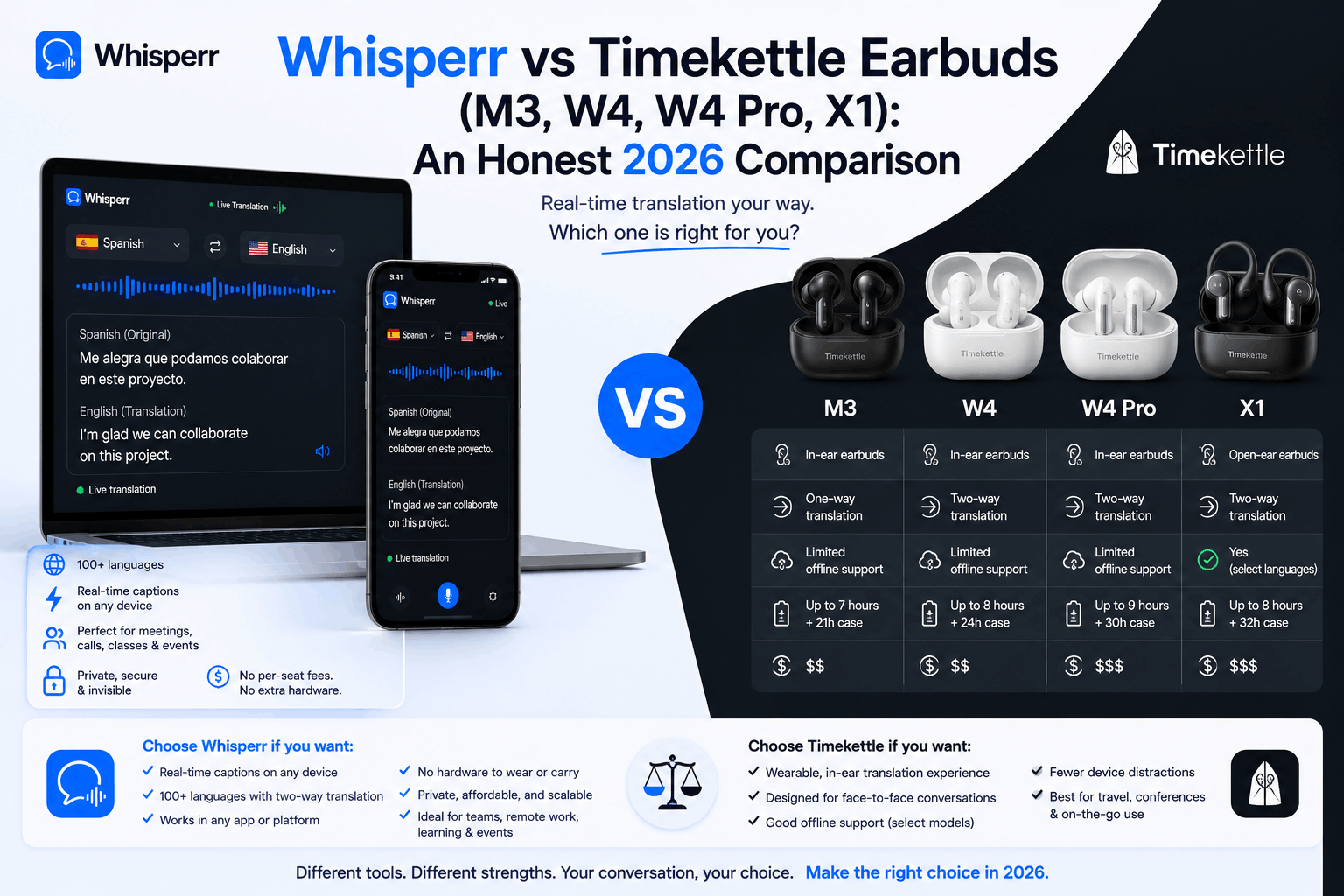
| Whisperr | Timekettle (W4 Pro flagship) |
|---|---|---|
Form factor | Software app | Dedicated earbuds + companion app |
Platforms | iOS, Android, Mac, Windows, Web | iOS + Android (companion app required for earbuds); X1 hub is standalone |
Languages supported | 100+ (per Whisperr site) | 43 languages / 96 accents (2026 portfolio update); W4 model: 52 languages / 106 accents |
Offline mode | Online only | Yes, for One-on-One and Listen & Play modes (requires downloaded language packs) |
Visual output | Floating subtitles, font-size controls, translation-only view, face-to-face screen flip — available on iOS, Android (via mobile browser), Web app, and the Mac app | Subtitles available in Media Translation mode (W4 Pro / X1) and in Timekettle's separate PC LiveTranslator app |
Audio output (voice playback) | TTS playback of translations | In-ear audio output via earbuds |
Broadcast / many viewers | Broadcast mode — one capturer, many read along on their own devices via a shared link | X1 hub supports up to 20 people / 5 languages simultaneously, but each person needs their own X1 device |
Usage limits | Unlimited — no monthly minute caps on translation, recording, or streamed audio | 300-minute/month cap on Media Translation (videos, online meetings, phone calls). Beyond that, users buy extra minutes via "Fish" virtual coins: 500 min for ~$9.99, 1,200 min for ~$18.99, 2,000 min for ~$27.99. One-on-One face-to-face mode is unlimited. |
Offline language packs | N/A (online-only) | First two language pairs free via vouchers; each additional pair costs ~$11 (5 Fish coins) |
Pricing | $9.99/week or $84.99/year (3-day free trial), all features included, unlimited usage | M3 ~$169 · W4 Pro $449 · X1 $699.99 (one-time purchase, but ongoing in-app costs for media-translation minutes and offline language packs) |
Use without phone | No (phone, Mac, or PC required) | X1 only (standalone Wi-Fi); W4 / W4 Pro / M3 require a connected phone |
Best for | Online meetings, foreign-language videos, lectures, multi-viewer broadcasts, in-person when you can put a screen between you | Quiet face-to-face conversation, private audio output, offline use, noisy environments where mic quality matters |
Where Whisperr is genuinely stronger
1. Floating subtitles over any app, on every screen you own
Whisperr's floating subtitles sit in a draggable window on top of whatever else is on your screen — a YouTube video, a Teams call, WhatsApp, a news article. The audio source can be a microphone, screen capture (on the Mac and Web app), or a meeting bot Whisperr sends into your Zoom/Teams/Meet call. The same floating-subtitle experience is available on iOS, Android (via a mobile browser at app.whisperr.co), the Web app on any desktop browser, and the Mac app — so whichever device you happen to have on you, you can get translated captions overlaid on whatever you're doing.
Timekettle has a separate desktop product called LiveTranslator (later rebranded PolyPal) that does something comparable for PCs and Macs — subtitles with customizable colors and transparency over online meetings. But it's a different product line from the earbuds, with its own 20-language list, and it isn't tightly integrated with the earbud experience. If you bought W4 Pros and assumed floating subtitles came with them, that's not exactly how the lineup is organized.
2. Font size, layout, and "translation only" view
Whisperr lets you change the font size of captions, switch between transcription + translation side-by-side or translation-only, and adjust how the caption window is laid out. Small details, but they matter when you're trying to read translated captions at a glance during a fast-paced meeting or a presentation across a room.
Timekettle's earbuds don't have a screen at all. The companion app does display transcripts, but the customization of how those subtitles look — fonts, sizing, layout — is more limited and depends on which Timekettle product line you're using.
3. Broadcast mode for many listeners
Whisperr's broadcast mode is a real differentiator: one person captures audio, shares a room link, and anyone can open the link on their own phone and read translated captions in their own preferred language. No account, no hardware, nothing to install for the listeners. This is the kind of thing that works well for tour guides, conference speakers, classroom teachers with multilingual students, or someone presenting to a global audience.
Timekettle's equivalent is the X1 hub, which can connect up to 20 people across 5 languages simultaneously — but each person needs their own X1 device (one unit costs $699.99). For a 20-person multilingual meeting, that's $14,000 in hardware. Whisperr's same multi-listener case is one subscription on the broadcaster.
4. Face-to-face mode with a flipped screen
Whisperr has a face-to-face mode where the screen is flipped for the person across from you, so two people can read translations from the same phone on a table between them — one reading right-side-up, the other reading the flipped half.
Timekettle solves the same problem differently and more elegantly in some ways: each person wears one earbud and hears the translation in their own ear. Whether you prefer "share a phone" or "share a pair of earbuds" depends entirely on the situation — sharing earbuds is intimate and hygienic-uncomfortable with strangers, while sharing a phone is fine for a business meeting but harder to do while walking around.
5. Cross-platform with no hardware lock-in
Whisperr runs on iOS, Android, Mac, Windows, and the Web app. There's no device to buy, lose, charge, or pair. If your phone dies, you can keep working on your laptop. If you upgrade your phone next year, your subscription and history follow you.
Timekettle's earbuds are tied to the Timekettle app, which is tied to a specific phone via Bluetooth. The earbuds themselves need charging — six hours of continuous translation on the W4 Pro, then back to the case. If you lose one earbud, the bidirectional mode breaks.
6. Continuous, long-form audio
Whisperr is built for continuous streamed audio — a one-hour lecture, a full Zoom meeting, an hour-long news segment, a YouTube livestream. The session keeps running; captions keep flowing.
Timekettle's earbuds are built primarily for conversations, where the system uses semantic segmentation to chop speech into translatable chunks. This works very well for back-and-forth dialogue and reasonably for media translation, but the design assumption is "two people exchanging short turns" more than "translate this 90-minute keynote".
7. Speech mode / TTS playback
Whisperr can read the translated text aloud through the device's speaker, which is useful when you want the other person to hear the translation rather than reading it from a screen. The speech mode can be real-time so that as the speaker is heard, the translation is spoken immediately without manually tapping the screen. This speech mode is supported for all 100+ languages.
Timekettle's "Speak Mode" does effectively the same thing — you speak into the device, the phone speaker plays the translated speech aloud — so this is roughly a parity feature rather than a Whisperr advantage. The bigger Timekettle audio advantage is in-ear, not phone-speaker, output.
8. Unlimited usage
This one matters more than it sounds. Whisperr's subscription includes unlimited translation time — there are no monthly minute caps, no per-meeting limits, no "you've used your 300 minutes this month" pop-ups. Whether you translate one hour or one hundred hours in a month, the price stays the same.
Timekettle's W4 Pro caps Media Translation (the mode used for videos, online meetings, and phone calls — i.e. the exact use cases most people buy translation hardware for) at 300 minutes per month. After that, you have to buy more minutes via Timekettle's "Fish" virtual coin system: 500 minutes for ~$9.99, 1,200 minutes for ~$18.99, or 2,000 minutes for ~$27.99. Face-to-face One-on-One mode is unlimited, so this cap doesn't affect tabletop conversations — but for anyone using the earbuds primarily for online meetings, livestreams, or media, you could blow through 300 minutes in five Zoom calls.
Whisperr's $84.99/year price doesn't degrade no matter how heavy a user you are. Timekettle's $449 upfront price implies a hidden monthly micro-budget for anyone leaning on Media Translation.
9. Accuracy in everyday scenarios
Whisperr's marketing claims very high accuracy and a low end-to-end latency. End-to-end latency is less than 0.2 seconds.
For Timekettle's part, the W4 (with bone-conduction sensor) claims up to 98% accuracy in noisy environments because the bone-conduction sensor only picks up the wearer's voice. That's a real hardware advantage when the noise floor is high — airports, train stations, busy markets — and one that pure-software approaches like Whisperr can't fully match through mic capture alone, since they're working with whatever audio the phone's mic picks up.
Where Timekettle is genuinely stronger
Being honest about this matters, because the choice depends on the use case.
Private, in-ear audio output
Reading captions on a screen isn't always possible — driving, walking, riding a bike, working with your hands. Timekettle's earbuds deliver translated audio directly to your ear, which Whisperr can't physically do without third-party hardware. For travel scenarios where you can't be staring at a phone, this is a meaningful advantage.
Offline mode
W4 Pro, W4, and M3 all support offline translation for the One-on-One and Listen & Play modes, with 13 downloadable language packs. This means you can translate without a Wi-Fi or cellular connection — useful on planes, in rural areas, or when roaming abroad without a data plan.
Whisperr is online-only and requires an internet connection to stream audio to its servers for transcription and translation.
Dedicated audio capture hardware
Triple microphones with vector noise cancellation on the W4 Pro, bone-conduction sensors on the W4 — these are dedicated audio hardware designed for one job. In genuinely noisy environments, the gap between dedicated mics and a phone's mic is real. Whisperr can't engineer around the phone's mic; Timekettle can engineer around the noise floor.
No mandatory recurring subscription (with caveats)
Timekettle is sold as a one-time hardware purchase with no required ongoing subscription. For users who only need short bursts of translation — quick travel conversations, occasional face-to-face meetings — the lifetime cost is essentially the device price.
The caveats are worth being honest about: as covered above, Media Translation has a 300-minute/month cap (extra minutes are pay-as-you-go via Fish coins), and offline language packs beyond the first two cost ~$11 each. So the "no subscription" framing is true in the strictest sense — no monthly auto-charge to your card — but heavy users can rack up meaningful in-app costs. Whisperr's flat $84.99/year is an upper bound; Timekettle's $449 is a floor.
For very light users, Timekettle's no-subscription model is genuinely cheaper. For anyone doing several hours of Media Translation per month, the cost differential narrows or reverses.
Standalone device (X1 only)
The X1 hub runs Wi-Fi-direct and doesn't need a phone or computer at all. It's a translator you can hand to someone who doesn't speak your language and let them use, hardware-style. Whisperr always needs a phone, laptop, or browser tab — there's no "standalone" mode.
Earbud functions you'd pay for separately
The W4 Pro doubles as regular Bluetooth earbuds — music, phone calls, the usual. The translation is a feature, not the whole product. If you'd already budgeted $200+ for nice earbuds, the marginal cost of Timekettle's translation hardware is lower than the sticker price suggests.
How to pick: by use case
Scenario | Better fit | Why |
|---|---|---|
Zoom / Teams / Meet meetings | Whisperr | Captures meeting audio directly; floating subtitles over the meeting window |
Foreign-language YouTube, livestreams, news | Whisperr | Streamed audio + subtitle overlay |
In-person business meeting at a desk | Either | Whisperr if you'd rather read; Timekettle if you'd both wear an earbud |
Travel — ordering food, asking directions | Timekettle | In-ear output; offline mode; no phone-glued-to-face awkwardness |
Lectures, classrooms, conferences (you listening) | Whisperr | Continuous streaming, floating subtitles, broadcast room with many readers |
Lectures, classrooms (you speaking, many listening in different languages) | Whisperr | Broadcast mode — listeners just open a link, no $700 device each |
Two people, conversation, both want audio | Timekettle | Wear one earbud each, hear the other's translation |
Noisy airport / train station conversation | Timekettle | Bone-conduction mic isolates wearer's voice |
Phone calls in a foreign language | Both work | Whisperr handles speakerphone capture; Timekettle's W4 Pro is built for this |
Multi-language conference for 20 people | Whisperr broadcast OR Timekettle X1 ×20 | Cost difference: one subscription vs. $14,000 in X1 hubs |
Driving, walking, hands-free | Timekettle | In-ear audio you can hear without looking at anything |
Watching foreign content while doing something else | Whisperr | Floating subtitle window over the video |
Pricing comparison
Whisperr:
- $9.99/week or $84.99/year (3-day free trial on the App Store)
- All features included
- Unlimited usage (no monthly minute cap)
- One subscription works across iOS, Android (web), Mac, and the Web app
Timekettle (one-time hardware cost):
- M3: ~$169
- W4: ~$299
- W4 Pro: $449
- X1: $699.99
Timekettle (potential ongoing costs):
- Media Translation usage above 300 min/month: from $9.99 (500 min) up to $27.99 (2,000 min)
- Additional offline language pairs: ~$11 per pair after the first two free
A one-year Whisperr subscription is roughly 15% the cost of a single W4 Pro. If you're a heavy user of Media Translation — daily online meetings, lectures, foreign-language video — the gap widens further once Timekettle's in-app minute purchases kick in. Whisperr's pricing is essentially flat regardless of usage; Timekettle's pricing scales with how much you actually translate streamed audio.
The honest framing: if hardware-quality audio capture and in-ear output are critical for your use case, the W4 Pro at $449 is a reasonable purchase — provided your usage stays inside the 300-minute Media Translation budget or you accept paying for extra. If your translation needs are screen-based, mostly online, and high-volume, Whisperr's unlimited subscription is dramatically cheaper, easier to share across devices, and avoids the "what if I lose an earbud" problem entirely.
The bottom line
Whisperr and Timekettle aren't really the same product. They're answers to the same question — how do I understand someone speaking a language I don't speak? — with different design philosophies behind them.
If you live on Zoom, Teams, YouTube, lectures, and broadcast scenarios where many people need translation from one source, Whisperr's software-first approach is built for exactly that. If you live in airports, restaurants, taxis, and noisy face-to-face conversations where staring at a phone screen isn't acceptable, Timekettle's earbuds are doing something software alone can't.
For most knowledge workers in 2026 — meetings, lectures, foreign media, occasional travel — Whisperr covers more of the actual use cases, with unlimited usage at a fraction of the upfront cost, on devices you already own. For frequent international travelers and people in genuinely noisy face-to-face environments who don't lean heavily on Media Translation, Timekettle's hardware edges are real and worth the price.
The good news: they're not mutually exclusive. Some people will use Whisperr for the 90% of their translation life that happens on a screen, and a pair of Timekettle earbuds for the 10% that happens face-to-face in a noisy market.
Try Whisperr — whisperr.co