Broadcast Mode
Broadcast Mode lets a speaker (or presenter) create a room and share a link — or a scannable QR code — so everyone can follow along in their own language. The presenter captures audio with Whisperr, and viewers open the room in any web browser to see the live transcription and translation — no app or sign-up required.
Each viewer is in charge of their own experience: they choose the language they want, and if they'd rather listen than read they turn on Speech mode and hear each translation spoken aloud, in the voice and at the speed they pick.

How It Works
- The speaker creates a room in the Whisperr app and selects a source language and a target language
- The speaker shares the room — copy the URL into Messages, Email or Slack, or (on the Web App) show the QR code so the audience can scan it off the screen
- Viewers open the link in any browser to see the live transcription and translation in real time
- Each viewer can switch their own language from the Translation language menu — up to 6 languages available in the room in total
- The speaker starts capturing audio through the Whisperr app using their device's microphone
- Viewers can tap Speech mode to have each translation read aloud, in their chosen language, voice and speed
One speaker, many viewers, many languages at once — Broadcast Mode supports 1-to-n broadcasting.
Get Started
As a speaker — choose your platform
Sharing the room
Every platform gives you a room URL with a copy button next to it — that link is all a viewer needs.
On the Web App, that link is stable. It's tied to your account (whisperr.co/app/room?channel=…), not to the individual recording, so the same link keeps working for every broadcast you ever start — print it once, or paste it into a recurring meeting invite, and it's still valid next time. On iPhone/iPad, Android, Mac and Windows, the link is per-session (whisperr.co/app/room?id=…): each new broadcast mints a new one, and the old link stops working once you stop that recording.
On the Web App there's also a QR code button beside the link. It opens a code that encodes the same stable URL, so a room full of people holding phones can scan it off your screen instead of retyping a room id — and, since the link doesn't change, a code you print once keeps working for every later talk. Download PNG saves it at print resolution, which is what you want if you're putting the code on a slide, a poster at the door, or a printed handout.
The QR code is currently a Web App feature; on iPhone/iPad, Android, Mac and Windows you share the copied (per-session) link.
As a viewer
- Open the room link — or scan the speaker's QR code — in any web browser (no installation needed)
- Pick the language you want in the Translation language menu at the top of the page
- Watch the transcription and translation appear in real time as the speaker talks
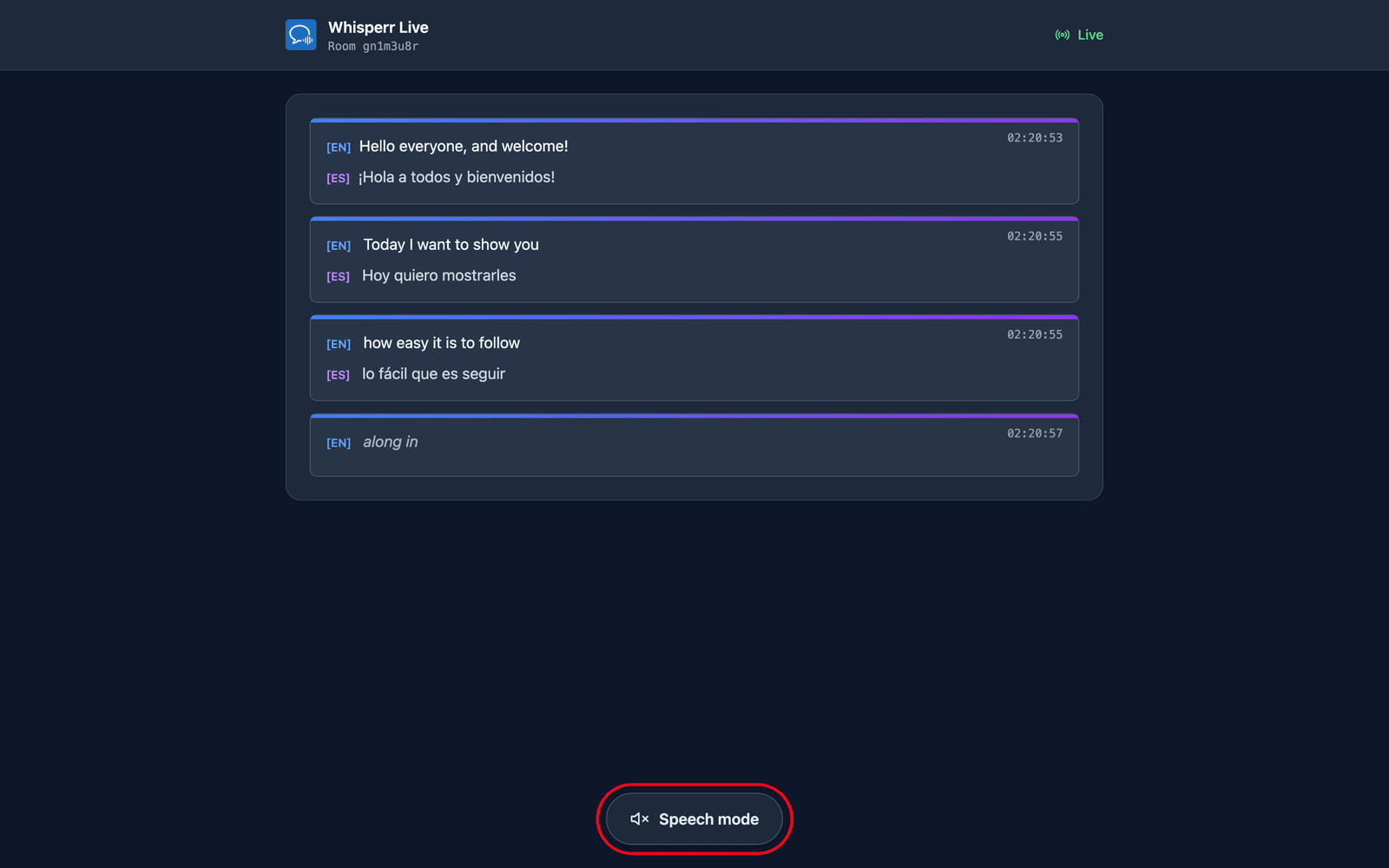
- Tap Speech mode at the bottom of the page if you'd rather listen than read
Choose the language you want
The room opens on As broadcast — the target language the speaker picked when they created it. The speaker's default plus up to 5 more make up the room's language list, for 6 language options total; open the Translation language menu at the top of the page to switch to any of them.
- Languages the room is already broadcasting are listed first with a green dot. Picking one costs nothing: it switches over on the speaker's next line.
- A new language, if the room hasn't reached its 6-language limit yet, has to be produced for you first, so you'll see Preparing your language… for a moment before lines start arriving in it.
- The menu has a search box — start typing the language name to filter the list.
Your choice is yours alone. It doesn't change what the speaker set or what anyone else in the room is reading. It's also remembered in your browser, so a reload — or a dropped connection — puts you back in the same language automatically.
Next to the language menu, Both / Transcription / Translation control whether you see the speaker's original words, your translation, or both stacked together.
Listen instead of reading — Speech mode
Speech mode starts off. Tapping it turns the button blue and reveals the speech controls at the top of the page — that same tap is also the gesture browsers require before they'll play audio, which is why it can't be on from the start.
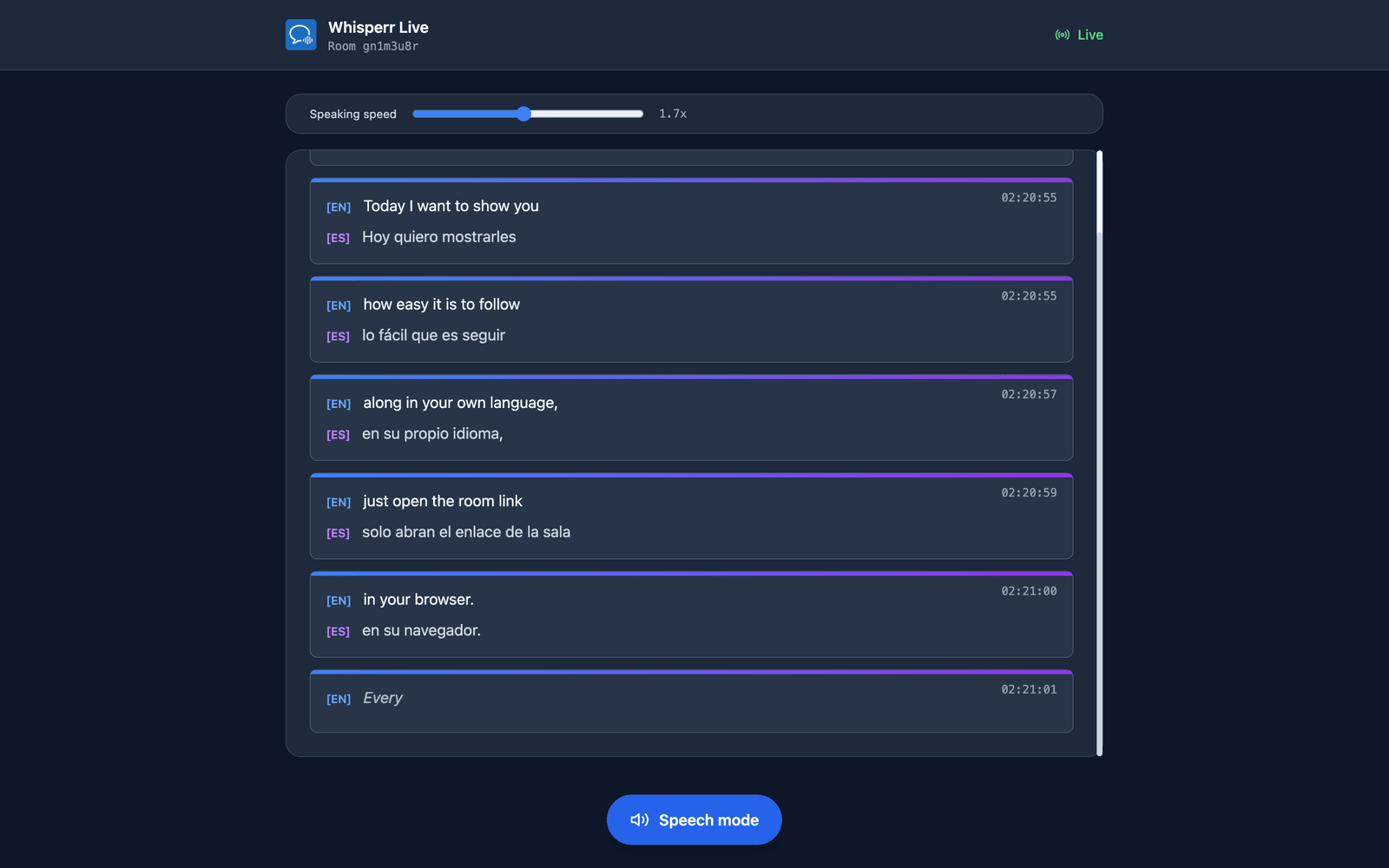
From then on Whisperr reads each translation aloud as soon as it's finalized, so you can listen while the text keeps scrolling on screen. It reads the language you selected — change the Translation language and the spoken audio follows it on the next line. Headphones are worth it in a quiet room: the audio plays out of your own device, not the speaker's. Each viewer chooses for themselves, so some of the audience can listen while the rest just read.
Voice and speaking speed
While Speech mode is on, two controls sit above the transcript:
| Control | What it does |
|---|---|
| Voice | Auto (the default) matches the reading voice to the person actually talking, from the acoustic profile Whisperr measures for each speaker — so in a two-person Q&A the two voices stay distinct. Male and Female pin a single fixed narrator instead, for listeners who'd rather have one predictable voice than one that tracks whoever has the microphone. |
| Speaking speed | 0.5x to 3.0x, defaulting to 1.7x. Spoken translation at 1.0x is slower than live speech, so the audio falls behind a fast talker; 1.7x keeps you near real time while staying easy to follow. |
Both are per-viewer and remembered in your browser, so you set them once.
Use Case Examples
- Conference talks and keynotes — put the QR code on your title slide and let every attendee follow in their own language
- University lectures — international students each pick their language and read translated subtitles in real time
- Religious services and community events — a printed QR code at the door, and a multilingual congregation follows along without an interpreter
- Tour guides — share a link with a group and narrate while everyone listens in their own language through their earphones
- Workshops and training sessions — participants can read along even if they're not fluent in the speaker's language
Supported Platforms
| Platform | Speaker / Presenter | Stable link | QR code | Viewer |
|---|---|---|---|---|
| Web App | ✅ | ✅ | ✅ | ✅ |
| iOS | ✅ | — | — | ✅ |
| Android | ✅ | — | — | ✅ |
| Mac | ✅ | — | — | ✅ |
| Windows | ✅ | — | — | ✅ |
Stable link means the room URL is tied to your account and stays the same across every broadcast. Only the Web App has this today — on the other platforms, starting a new broadcast always gives you a new, one-time room link. See Broadcast Mode on the Web App for details.
Viewers are always in a browser, so the language menu, Speech mode, voice and speed are the same on every platform.
Related
- Speech Mode — the same spoken-translation layer inside the Whisperr apps
- Microphone Audio Capture — how Whisperr captures audio from the speaker's device
- Floating Subtitles — overlay subtitles on top of other apps
- In-Person Meetings — translate face-to-face conversations
- Meeting Bot — send a bot to join your online meetings instead