Whisperr in ChatGPT
This page walks you through connecting Whisperr to ChatGPT as a custom MCP server, one screen at a time. You sign in to Whisperr with your normal account and click Allow. There's no key to copy.
For what you can do once it's connected, see the MCP Integration overview. Using the terminal? See Codex. Using Claude instead? See Claude Desktop or Claude Code.
Before You Start
- ChatGPT on the web, signed in. You add the server on chatgpt.com. Whether you can add a custom MCP server depends on your ChatGPT plan and workspace (see Business, Enterprise, and Edu below).
- A Whisperr account — sign in to the Web App. Sending meeting bots needs an active subscription; reading your saved conversations doesn't.
How to Connect Whisperr
1. Copy the server address
- Go to whisperr.co/app and sign in
- Click MCP Integration in the sidebar, right below Dictionary
- Under Claude on claude.ai or the desktop app, click the copy button next to the address. It ends in
/mcp. ChatGPT uses the same address.
Keep it on your clipboard for step 3.
2. Open Plugins and add a custom MCP server
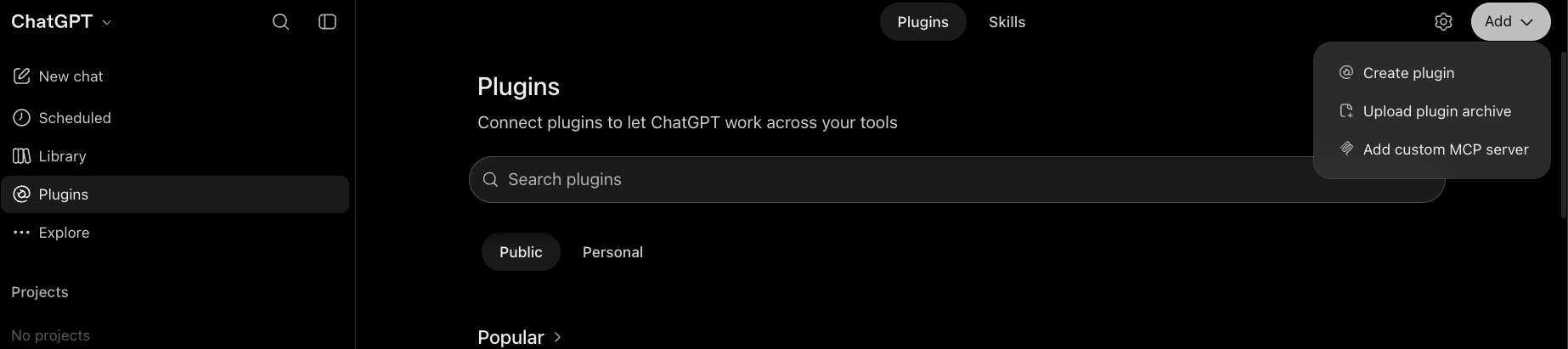
In ChatGPT on the web, click Plugins in the left sidebar. Click Add at the top right, then choose Add custom MCP server.
3. Fill in the form and create the plugin
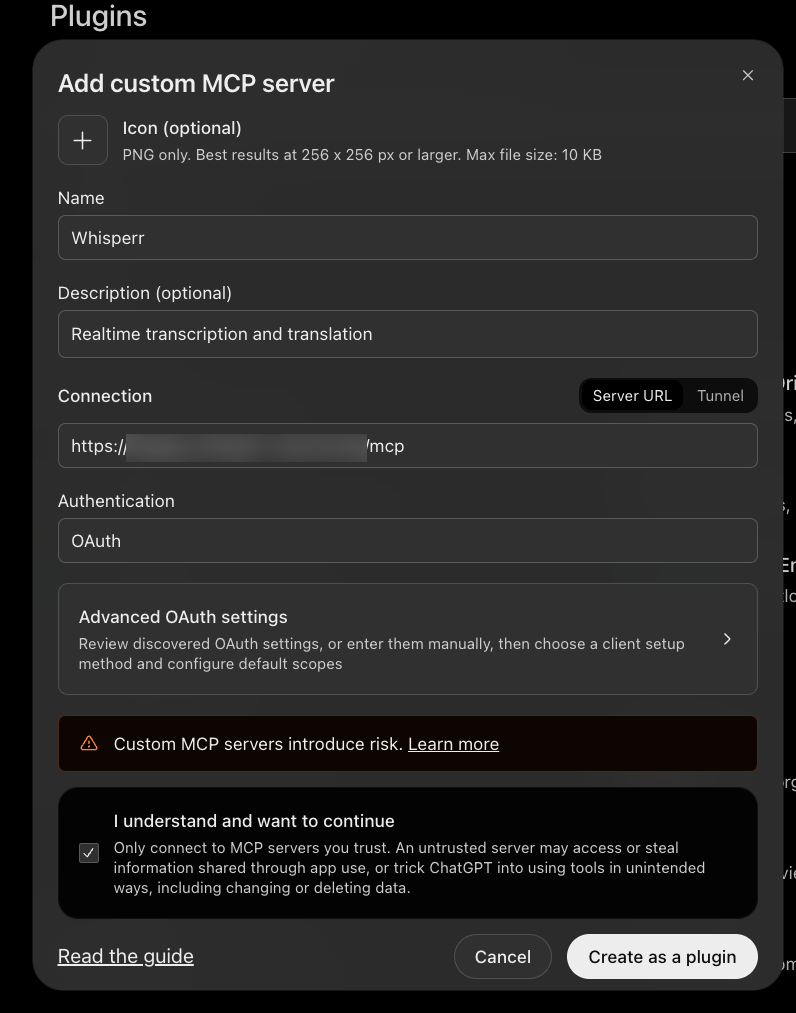
- Name: type
Whisperr. It's how the plugin appears in ChatGPT. - Description (optional): for example, "Realtime transcription and translation"
- Under Connection, leave Server URL selected and paste the address you copied
- Under Authentication, choose OAuth. Leave Advanced OAuth settings as they are: Whisperr registers ChatGPT automatically.
- Tick I understand and want to continue. ChatGPT warns that custom MCP servers introduce risk and that you should only connect to servers you trust. Whisperr is your own account's server, so this is expected.
- Click Create as a plugin
4. Click Connect Whisperr
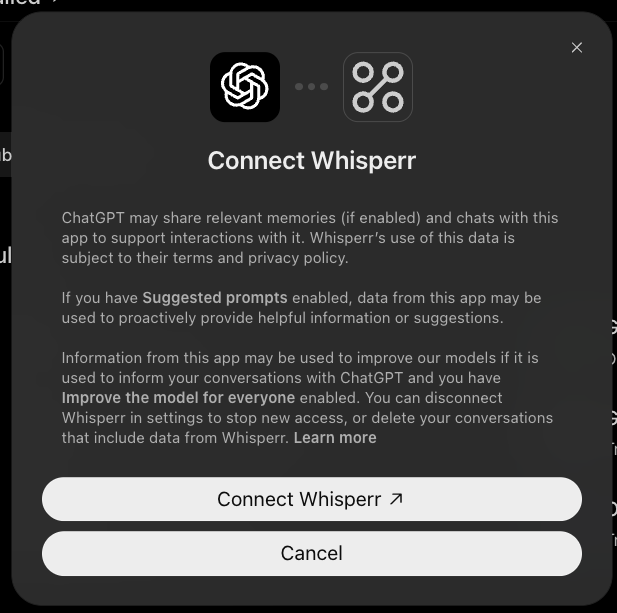
ChatGPT shows a notice about how it shares data with the app, and that Whisperr's use of that data is subject to Whisperr's own terms and privacy policy. Click Connect Whisperr.
5. Sign in to Whisperr and click Allow
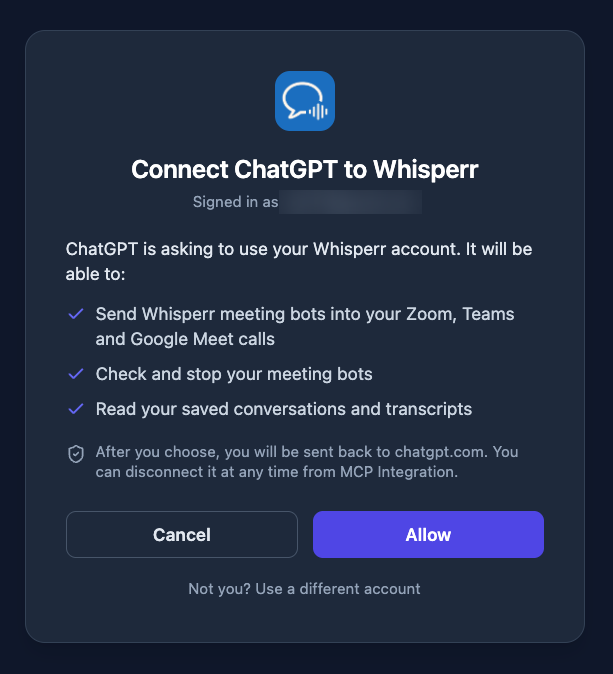
ChatGPT sends you to Whisperr to sign in. If you're not signed in, sign in first (Google, Apple, or email, whichever you use for Whisperr). Then you'll see Connect ChatGPT to Whisperr, with the account you're signed in as and exactly what ChatGPT will be able to do:
- Send Whisperr meeting bots into your Zoom, Teams, and Google Meet calls
- Check and stop your meeting bots
- Read your saved conversations and transcripts
Click Allow. (Cancel connects nothing. If it's the wrong account, click Not you? Use a different account.) You're then sent back to ChatGPT.
Only click Allow if you just started this from ChatGPT yourself. If a page you didn't expect asks you to connect ChatGPT to Whisperr, click Cancel.
6. Use it in a chat
Start a new chat and ask ChatGPT, in plain words:
| Ask | What happens |
|---|---|
| "Give me the last few transcripts from Whisperr" | Your saved conversations, with titles, a summary line, and links |
| "Read my most recent Whisperr conversation and summarize it" | ChatGPT reads the transcript and its translations, then summarizes |
| "Send a Whisperr bot to your meeting link for English and Japanese" | A bot joins and ChatGPT gives you the live transcript link. Admit "Whisperr Bot" if the meeting has a lobby |
| "Is the Whisperr bot in the meeting yet?" / "Stop the Whisperr bot" | ChatGPT checks on it, or makes it leave |
ChatGPT uses Whisperr when your question is about your meetings or transcripts. Mention Whisperr in your message to make sure, or type @ and choose Whisperr.
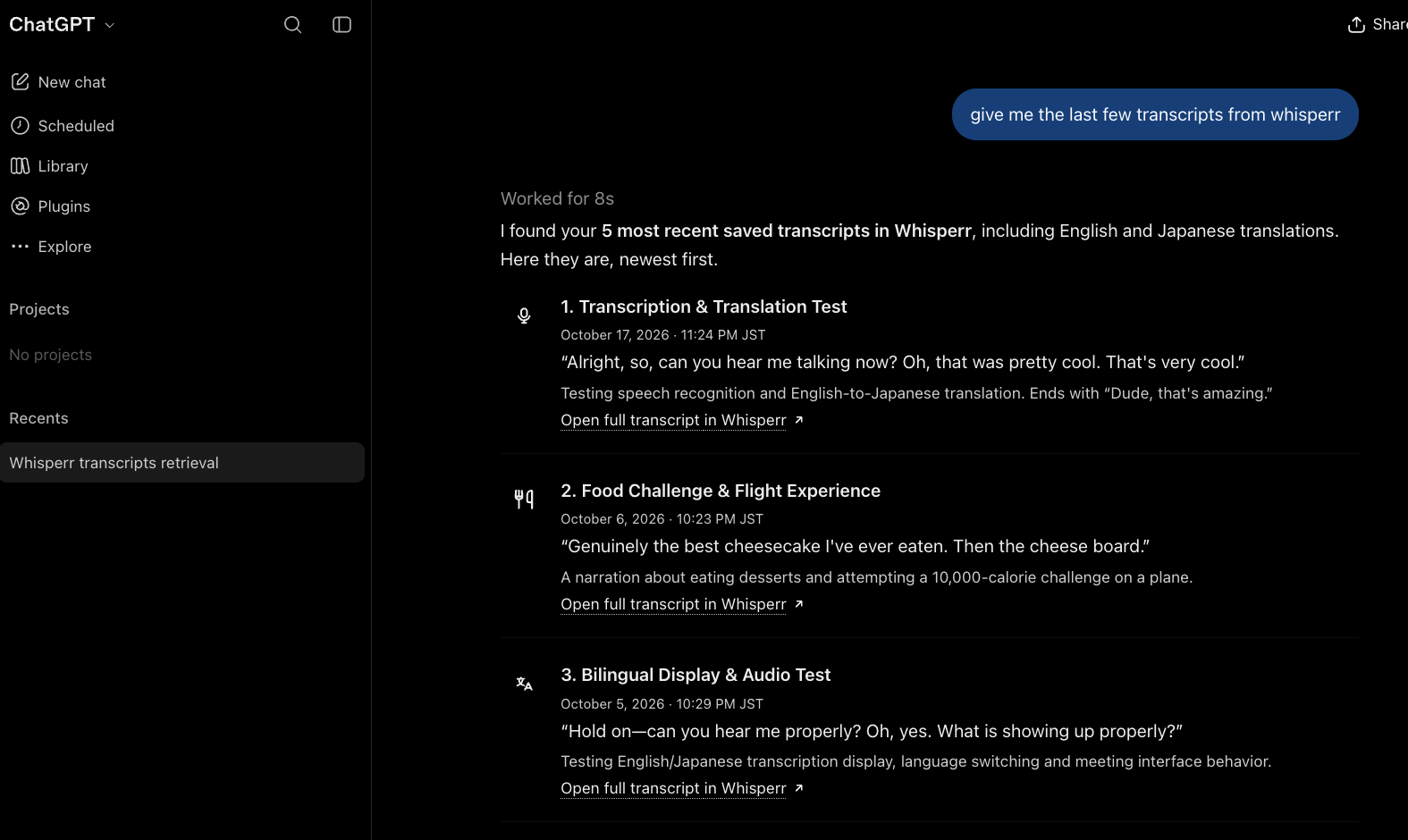
ChatGPT may ask you to confirm before it sends or stops a bot. You can choose to remember your answer for the rest of that conversation; a new conversation asks again.
Your plan runs one bot at a time. If ChatGPT says you've reached the limit, ask it to stop the running bot first.
Business, Enterprise, and Edu
Whether you can add a custom MCP server depends on your ChatGPT plan and your workspace's settings. On a Business workspace, only workspace admins and owners can add one, and your workspace's own policies still apply. If you don't see Add custom MCP server under Add on the Plugins page, ask your workspace admin. Whoever installs the Whisperr plugin signs in to their own Whisperr account when asked, so ChatGPT only ever acts as the person who connected it.
Disconnect Whisperr
- From Whisperr: open MCP Integration in the Web App. Under Connected apps you'll see ChatGPT and when it connected. Click Disconnect. ChatGPT is signed out and has to connect again to work.
- From ChatGPT: open Plugins and remove the Whisperr plugin.
If Whisperr Changes
If Whisperr adds or changes what it can do, ChatGPT doesn't pick that up by itself. Open the Whisperr plugin in Plugins, select Refresh, then start a new conversation.
Troubleshooting
| What you see | What to do |
|---|---|
| There's no Add custom MCP server option | Use ChatGPT on the web (chatgpt.com), not a phone app. Look under Add at the top right of the Plugins page. On Business, only admins and owners can add one, so ask your workspace admin. Availability also depends on your plan. |
| ChatGPT can't connect to the server | Check the address: it must be the full https://…/mcp address from MCP Integration, with no extra spaces. |
| Connect Whisperr opens a Whisperr page asking you to sign in, then nothing | Make sure you click Allow. If you clicked Cancel, click Connect Whisperr again. |
| The Whisperr page says the sign-in request isn't valid or has expired | The request only lasts a short while. Go back to ChatGPT and click Connect Whisperr again. |
| Whisperr says your account has reached its limit of API keys | Each connected app uses one key. Open MCP Integration (or the Developer Console) and remove a key or app you don't use, then try again. |
| ChatGPT doesn't use Whisperr in a chat | Mention Whisperr in your message, or type @ and choose Whisperr. Naming the action helps, for example "list my Whisperr conversations". |
| The Whisperr tools are missing or out of date | Open the plugin in Plugins, select Refresh, and start a new conversation. |
| "subscription_required" | Sending a bot needs an active subscription. Reading conversations works without one. |
| "concurrency_limit" | A bot of yours is still in a meeting. Stop it first. |
| The bot doesn't join | Check the meeting link and look for a lobby — the host must admit "Whisperr Bot". |
| "No saved conversations" | ChatGPT only sees conversations saved to the cloud. Run a bot or turn on Store on the Cloud first. |
More in the MCP Integration overview.
Related
- MCP Integration — what ChatGPT and Claude can do with Whisperr
- Codex (terminal) — add Whisperr to Codex with two commands
- Claude Desktop — connect the Claude desktop app instead
- Claude Code (terminal) — add Whisperr from your terminal
- Meeting Bot — how the bot joins calls