Meeting Bot
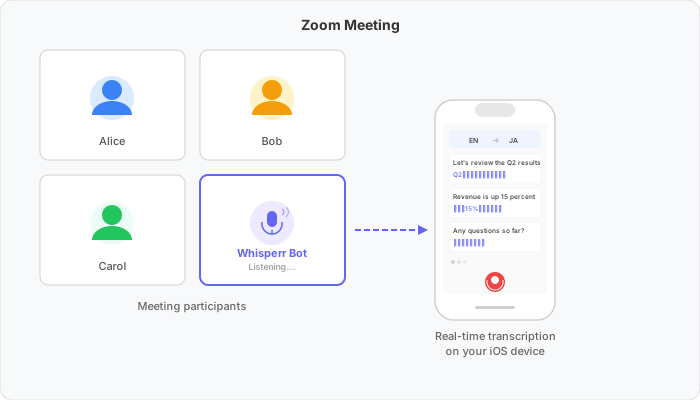
Send a Whisperr bot to join your online meeting and get real-time transcription and translation directly on your device (iOS, Mac, Windows, or the Web App). The bot joins as a participant, listens to the conversation, and streams the translated text to your device.

How It Works
- Paste a meeting link (Zoom, Teams, or Meet) into the Whisperr app
- The Whisperr bot joins the meeting as a participant and begins listening
- Transcription and translation appear in real time on your device
Get Started
Choose your platform for step-by-step setup:
Android support is coming soon.
Supported Platforms
| Platform | Supported | Notes |
|---|---|---|
| iOS | ✅ | Transcription and translation on your device |
| Mac | ✅ | Desktop app — the bot dials into the call |
| Windows | ✅ | Desktop app — the bot dials into the call |
| Android | 🔜 | Coming soon |
| Web App | ✅ | The bot dials into the call — setup guide |
| Chrome Extension | ❌ | Use Floating Subtitles instead |
Supported Meeting Platforms
| Meeting Platform | Supported |
|---|---|
| Zoom | ✅ |
| Google Meet | ✅ |
| Microsoft Teams | ✅ |
Related
- Microphone Audio Capture — capture audio through your device's microphone instead
- Floating Subtitles — overlay subtitles on top of other apps
- Online Meetings — other ways to get subtitles during calls