Microphone Audio Capture
Whisperr captures audio through your device's microphone and transcribes and translates speech in real time. This is the core of how Whisperr works — whether you're in a face-to-face conversation, a lecture hall, or watching a video, Whisperr listens through your mic and converts spoken words into text.

How It Works
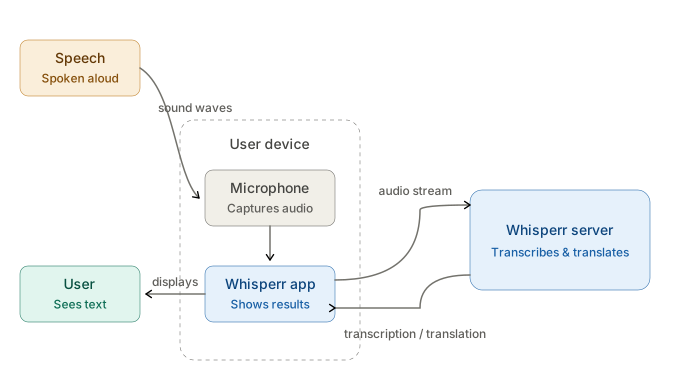
- Whisperr accesses your device's microphone — built-in or external
- Audio is streamed to Whisperr's speech engine for real-time processing (requires an internet connection)
- Transcribed text appears on screen as the speaker talks, with optional translation into your target language
Get Started
Choose your platform for step-by-step setup:
Supported Platforms
| Platform | Supported | Notes |
|---|---|---|
| iOS | ✅ | Captures external audio using microphone |
| Mac | ✅ | Captures external audio using microphone |
| Web App | ✅ | Requires browser mic permission |
| Chrome Extension | ❌ | Use Web App to capture mic |
| Android | ✅ | Captures external audio using microphone |
| Windows | ✅ | Captures external audio using microphone |
Related
- In-Person Meetings — best setup for face-to-face conversations
- Two Way Conversation — listen for two languages at once through the same microphone
- Online Meetings — capturing audio from video calls
- Floating Subtitles — see transcription over other apps