In-Person Meetings
Use Whisperr to transcribe and translate face-to-face conversations in real time. The app captures audio through your device's microphone and displays translated text on screen — ideal for business meetings, classrooms, conferences, and travel.
How It Works
- Place your device near the speaker — Whisperr listens through the microphone
- Speech is transcribed and translated in real time on your device screen
- Both parties can follow the conversation without needing a shared language
Use Case Scenarios
1. Two-Way Conversation
Two people speaking different languages can communicate face-to-face using Whisperr.
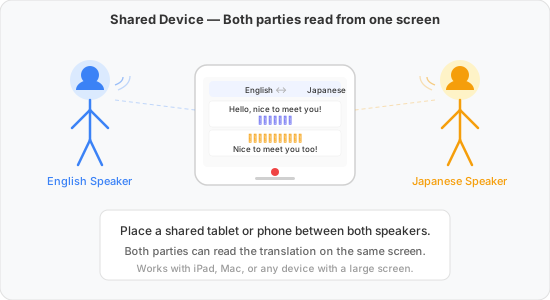
A) Shared screen — place a tablet or phone between both speakers, or use the Web App and project the screen onto a wall. Both read the two-way translation on the same screen.
- Recommended setup: 1) Use the Web App and display it on a big screen or projector, or 2) use a mobile device and stand close to each other
- Pros: You only need one screen
- Cons: Only one person can look back at the conversation. Only two languages can be translated at the same time.
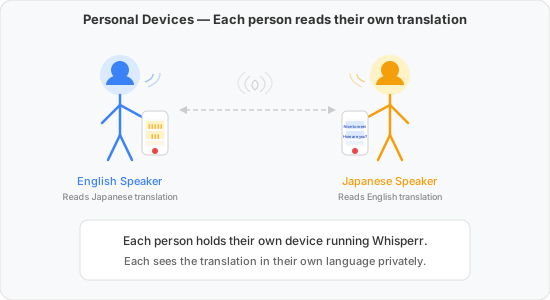
B) Personal devices — each person holds their own phone running Whisperr. Each sees the translation in their own language privately.
- Recommended setup: Use a mobile device or the Web App on a laptop
- Pros: Each person can change readability settings and have full control of their device
- Cons: Each person needs the app and a subscription
2. Listening to a Lecture, Meeting, or Conference
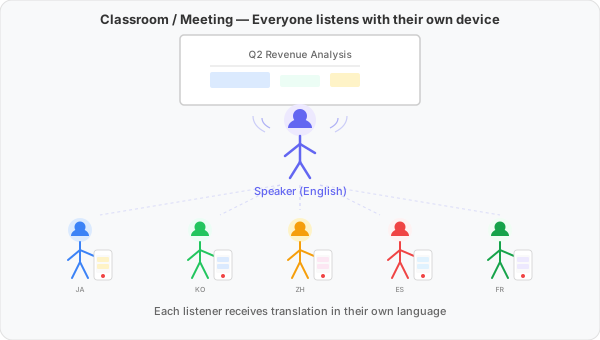
Multiple people want to follow a speaker (or presenter) in their preferred language. There are two ways to do this:
A) Broadcast Mode (recommended) — the speaker captures audio with Whisperr once and shares a room link. Every listener opens the link in their browser and follows along. One source of audio, many listeners (1-to-n).
- Recommended setup: speaker uses Broadcast Mode; listeners open the room link in any browser
- Pros: best transcription accuracy (audio captured at the source); listeners don't need the app or a subscription; the speaker controls the session for everyone
- Cons: the speaker has to set up the room and share the link
B) Each listener captures independently — each listener uses Whisperr on their own device and captures the speaker's voice through their own microphone. Each device is doing its own 1-to-1 capture in parallel.
- Recommended setup: iOS, Android, or Web App (using a laptop)
- Pros: each listener can start transcribing anytime they need it, in their own language; no setup from the speaker
- Cons: each listener needs the app and a subscription; transcription quality depends on each listener's distance from the speaker; the speaker cannot make sure all listeners understand
More Examples
- Travel — talk to locals, ask for directions, or order food while abroad
- Medical and legal settings — bridge language gaps in critical conversations
- Conferences and events — understand keynote speakers and panel discussions in real time
Tips for Best Results
- Place your device close to the speaker — within 1–2 meters for best accuracy
- Use an external microphone for large rooms or noisy environments — a lapel mic significantly improves quality
- Reduce background noise — turn off TVs, fans, or music that isn't the target audio
- Use Floating Subtitles on iOS / Android to keep subtitles visible while using another app
Supported Platforms
| Platform | Supported | Notes |
|---|---|---|
| iOS | ✅ | Captures external audio using microphone |
| Mac | ✅ | Captures external audio using microphone |
| Web App | ✅ | Requires browser mic permission |
| Chrome Extension | ❌ | Use Web App to capture mic |
| Android | ✅ | Captures external audio using microphone |
| Windows | ✅ 🔜 | Coming soon |
Related
- Broadcast Mode — share one speaker's translation with many listeners over a link
- Microphone Audio Capture — how microphone capture works in detail
- Online Meetings — translate Zoom, Teams, or Meet calls
- Floating Subtitles — overlay subtitles on top of other apps