Videos and Entertainment
Watch videos, movies, and live streams with real-time transcription and translation using Whisperr. Whether it's a TikTok Live, a YouTube video, or a Netflix show, Whisperr captures the audio and shows translated subtitles on your device.
The right setup depends on which device you're watching on. Use the guide below to pick yours.
How It Works
- Play a video or stream — TikTok, YouTube, Netflix, Instagram, or any media
- Whisperr captures the audio and transcribes it in real time
- Translated subtitles appear on screen so you can follow along in your preferred language
Which Device Are You Watching On?
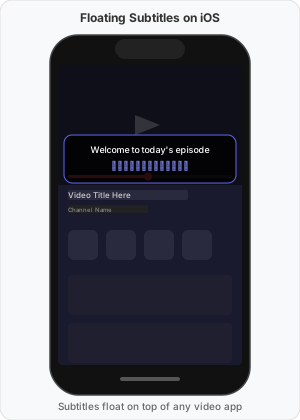
📱 Phone or tablet — use Floating Subtitles
You're watching in the TikTok, YouTube, or Instagram app on your phone. Start Whisperr with Floating Subtitles on, then switch to the video app: the translation floats on top of the video, so you never have to leave it.
- iPhone / iPad → Floating Subtitles on iPhone and iPad
- Android → Floating Subtitles on Android
- Pros: Subtitles stay on screen over the video — no app switching, no second device
- Cons: Some apps need the video playing before you turn floating subtitles on (see App Compatibility below)
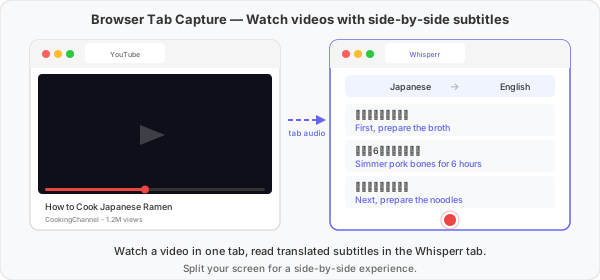
💻 Computer, watching in a browser — use the Web App
You're watching on tiktok.com, youtube.com, or another website in Chrome. Open the Whisperr Web App in a second tab and capture the audio straight from the video tab. Nothing to install, and the audio is captured digitally so there's no background noise.
- Web App → Floating Subtitles on the Web App
- Pros: Best audio quality, works with any website, no download
- Cons: Whisperr can only capture a browser tab — not a window, the whole screen, or a native desktop app. Put the two tabs side by side to watch and read at once
🖥️ Computer, using the Whisperr desktop app — capture System audio
You have the Whisperr app installed on your Mac or Windows PC. Open the stream in any browser (or any app), switch Whisperr's source to System audio, and keep the Whisperr window next to the video. This is the most flexible desktop option because it captures whatever your computer is playing, not just one browser tab.
- Mac → Floating Subtitles on Mac
- Windows → Floating Subtitles on Windows
- Pros: Captures any app or browser, not only a tab; clean digital audio
- Cons: Requires installing the desktop app; subtitles show in the Whisperr window rather than over the video
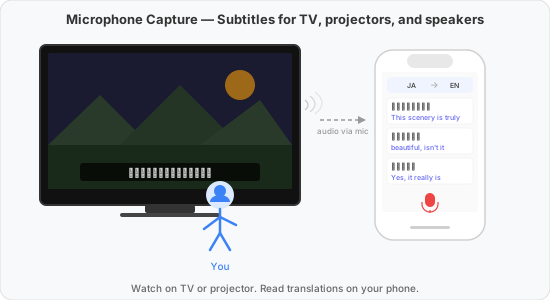
📺 TV, projector, or another device — use Microphone Capture
You're watching on a TV, a projector, or someone else's screen. Play the video on the speakers and let Whisperr listen through the microphone of your phone or laptop placed nearby.
- Any platform → Microphone Audio Capture
- Pros: Works with any video source — TV, projector, cinema, or any device
- Cons: Background noise can reduce accuracy; quality depends on speaker volume and distance
Quick Comparison
Floating Subtitles works with most video and streaming apps — a small number, like Zoom, Teams, Meet, and Webex, block it entirely; see App Compatibility below.
| You're watching on… | Use | Audio Quality | Guide |
|---|---|---|---|
| iPhone / iPad (most apps) | Floating Subtitles | Best | iPhone and iPad |
| Android (most apps) | Floating Subtitles | Best | Android |
| Computer, in a Chrome tab | Web App tab capture | Best | Web App |
| Mac, with the desktop app | System audio capture | Best | Mac |
| Windows, with the desktop app | System audio capture | Best | Windows |
| TV, projector, or another device | Microphone Capture | Varies | Microphone Audio Capture |
Example: Watching a TikTok Live
- On your phone: open Whisperr, turn on Floating Subtitles, start recording, then open the TikTok app and join the Live. The translation floats over the stream.
- On a computer in Chrome: open the Live at tiktok.com in one tab and app.whisperr.co in another, click record, choose Screen Capture, and pick the TikTok tab.
- On a Mac or Windows PC with the desktop app: open the Live in any browser, switch Whisperr to System audio, and click record.
App Compatibility (Floating Subtitles)
| App | Supported | Notes |
|---|---|---|
| TikTok | ✅ | Including TikTok Live |
| YouTube | ✅ | |
| ✅ | ||
| Weverse | ✅ | |
| Amazon Prime | ✅ *1 | Floating subtitles must be started after the video begins playing |
| Netflix | ✅ *1 | Floating subtitles must be started after the video begins playing |
| Zoom, Teams, Meet, Webex | ❌ | Not supported on iOS or Android due to privacy restrictions — see Online Meetings |
*1 On these platforms, start playing the video first, then enable floating subtitles in the Whisperr app.
If Floating Subtitles Is Blocked
Some apps refuse to let Floating Subtitles capture their audio at all — Zoom, Teams, Meet, and Webex block it outright on iOS and Android due to privacy restrictions, and other apps can behave the same way. When that happens, switch to Microphone Capture on the same device instead: put the app on the loudspeaker (not headphones), start Whisperr with the Microphone source, and turn off Echo Cancellation.
- Play the audio on the loudspeaker, not headphones. If the sound never leaves the speaker, there's nothing for the microphone to hear.
- Turn off Echo Cancellation on that same device. It exists to filter a device's own speaker audio out of its mic — exactly the audio you're trying to capture here — so it needs to be off, not on.
- This only works because it's one device doing both jobs. If you're listening with a separate device instead — like the TV and projector setup above — Echo Cancellation on the listening device is irrelevant, since it only ever filters that device's own speaker output, not audio coming from something else in the room.
This is a microphone capture setup, so the same tradeoffs apply: background noise can reduce accuracy, and quality depends on speaker volume and distance.
Supported Platforms
| Platform | Supported | How it captures the video |
|---|---|---|
| iOS | ✅ | Floating subtitles overlay on top of video apps |
| Android | ✅ | Floating subtitles overlay on top of video apps |
| Web App | ✅ | Captures audio directly from a browser tab |
| Mac | ✅ | Captures system audio from any app or browser |
| Windows | ✅ | Captures system audio from any app or browser |
Tips for Best Results
- Prefer digital capture — floating subtitles on mobile, tab capture in the Web App, or system audio on desktop all avoid microphone noise
- Change font size in Whisperr settings to improve readability during long viewing sessions
- Reduce background noise when using microphone capture — turn off other audio sources
Watching With Others
Watching with friends or family who don't all speak the same language? Use Broadcast Mode instead of setting up floating subtitles on every device. Capture the video's audio with any of the methods above, start a broadcast room, and share the link — or, from the Web App, a QR code.
- Everyone who opens the room picks their own language — one person can read Spanish subtitles while another reads Japanese, all from the same stream
- Anyone who'd rather listen than read can turn on Speech mode in the room to hear the translation spoken aloud, in the voice and speed they choose
- Viewers just need a browser — no Whisperr account or app install required
Restrictions
- iOS and Android: Cannot display floating subtitles over Zoom, Teams, Meet, or Webex due to privacy restrictions — use the same-device Microphone Capture workaround above instead. Some streaming apps (Amazon Prime, Netflix) require starting the video before enabling floating subtitles.
- Web App: Can capture audio from a browser tab only — not from the entire screen, a window, or native desktop apps. Use the Mac or Windows app if you need that.
Related
- Floating Subtitles — how floating subtitles work in detail
- Microphone Audio Capture — how microphone capture works
- Echo Cancellation — turn off to capture audio your own device is playing
- Broadcast Mode — share the translation with a room full of viewers, each in their own language
- Online Meetings — translate Zoom, Teams, or Meet calls
- OBS Live Streaming — add translated subtitles to your own stream