Whisperr vs iTranslate: Which Live Voice Translator Should You Actually Use?

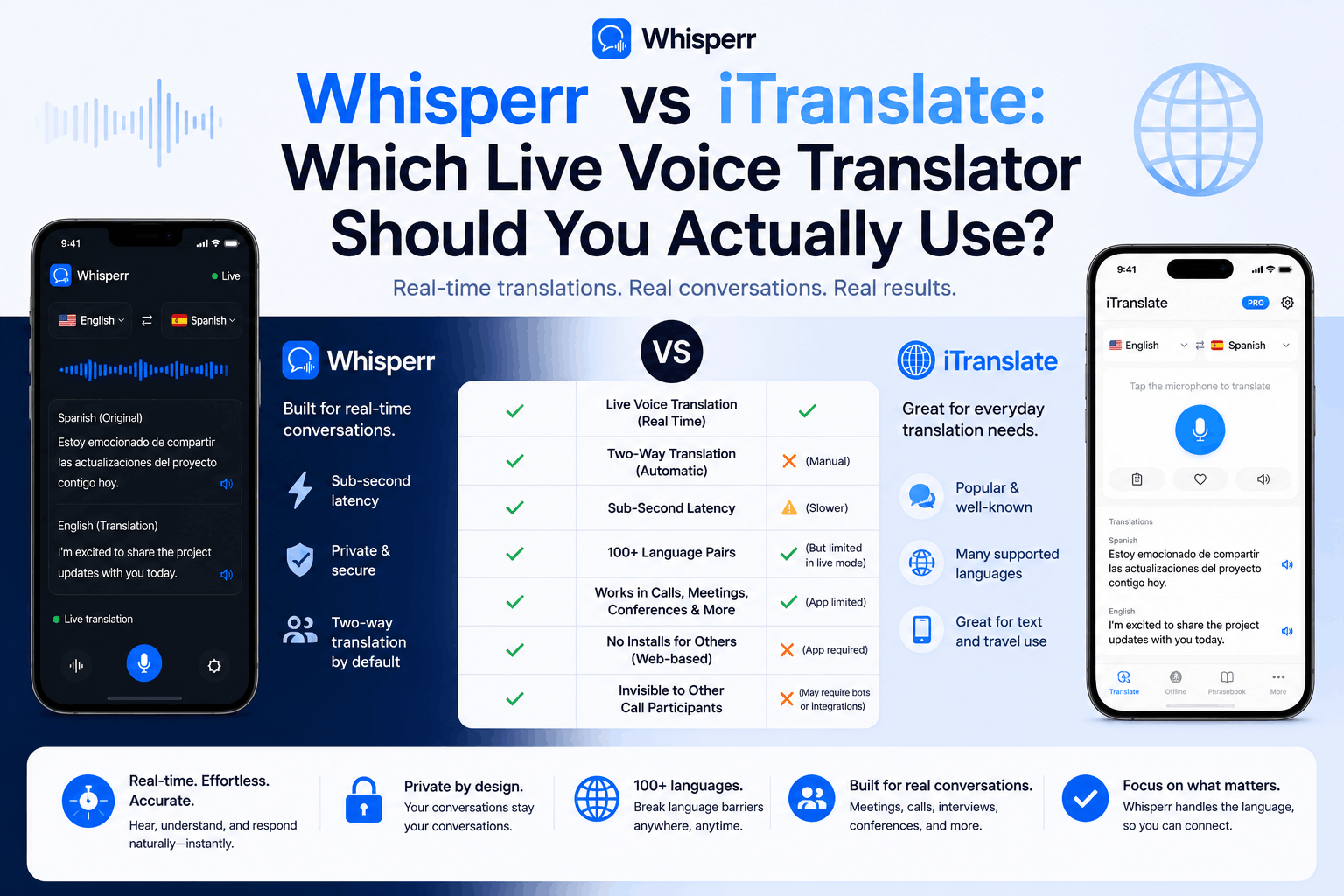
You're trying to pick a translation app and the two names that keep coming up are Whisperr and iTranslate. They sound similar on the surface, both translate speech, both run on your phone, and both claim "real-time." But once you look at what each one is actually designed for, they're almost not in the same category.
This guide breaks down what each tool does well, what it can't do, and how to pick the right one for your situation, without the marketing fog.
What each tool actually is
A lot of confusion in this comparison comes from the fact that "translation app" covers about five different product categories. Here's what each one is, in plain terms.
iTranslate
iTranslate is a translation suite that's been around since 2008, developed by Tipit GmbH. It's actually a family of apps under one subscription:
- iTranslate Translator, the flagship app. Text translation in 100+ languages, plus voice, camera (Lens mode), dictionary, verb conjugations, and a 250+ entry phrasebook.
- iTranslate Voice, a voice translation app with 40+ languages, predefined travel phrases, and exportable transcripts.
- iTranslate Converse, a tap-and-hold conversation app for in-person back-and-forth across 38 languages, plus an Apple Watch version.
The product is mobile-first (iOS and Android), with a browser extension and a Mac desktop wrapper. It positions itself as a travel companion and a language-learner's tool: phrasebook, flashcards, keyboard extension for iMessage / WhatsApp / Instagram, dictionary lookups, verb tables.
Whisperr
Whisperr is a realtime voice translator built specifically for streamed, continuous audio. It runs as a web app on any modern browser (Mac, Windows, Chromebook, Linux), as native apps for iPhone and Android, and as a Chrome extension. The product is built around several modes:
- Live Speech mode: point your phone or laptop mic at a speaker (or yourself) and read translated captions side-by-side in real time. You pick two languages and two-way translation runs by default, automatically detecting which language is being spoken and translating to the other.
- Live Broadcast mode: one person captures the audio (their mic, or a browser tab from Zoom / Teams / Google Meet / Webex / YouTube) and shares a single room URL. Anyone who opens that URL reads the translated captions live, in their own language, on any device, without signing up.
- Face-to-Face mode: the screen splits and one half flips upside down so the person across the table can read their translation without picking the phone up or turning it around.
- Floating Subtitles: a Picture-in-Picture caption window that sits on top of any other app on iPhone, Android, or in the browser. Works over YouTube, Instagram Live, TikTok Live, Zoom, Teams, foreign-language news streams, basically anything playing audio.
- High accuracy on sustained speech: Whisperr is optimized for continuous audio, where most general-purpose voice translation apps degrade. Conversations, lectures, and meetings stay readable end-to-end.
The product is built for situations where audio doesn't stop and start politely, which is most real-world communication.
Head-to-head: what each one can and can't do
The honest summary, organized by what people actually use these tools for.
Translating in-person face-to-face conversations
| iTranslate | Whisperr |
|---|---|---|
Push-to-talk turn-taking (you press, you speak, it translates) | ✅ Yes, "Tap & Hold to Speak. Release to Translate" | ✅ Yes |
Continuous speech, no tap needed | ❌ No, designed for one phrase at a time | ✅ Yes, Live Speech mode listens continuously |
Auto-detect which of two languages is being spoken | ✅ Yes (Converse) | ✅ Yes, two-way translation is on by default |
Split screen with one side flipped for the other person | ❌ Not on iPhone (Apple Watch flips text 180°; iPhone uses a single full-screen button) | ✅ Yes, Face-to-Face mode |
Apple Watch support | ✅ Yes (Converse) | Not documented |
Works offline | ✅ Yes (Pro tier, subset of languages) | ❌ Requires an internet connection |
Bottom line: For two people at a café exchanging short sentences, iTranslate Converse is honestly very good. The single-button UI is clean and the Apple Watch version is a genuine differentiator. The moment the conversation gets long, say a real 30-minute discussion where neither side wants to keep tapping, iTranslate's turn-based model gets tiring, and Whisperr's continuous Live Speech mode is the better fit.
Translating Zoom, Teams, Google Meet, Webex, and other video calls
| iTranslate | Whisperr |
|---|---|---|
Desktop or browser app that can capture meeting tab audio | ❌ No native support for capturing meeting audio | ✅ Yes, the Whisperr web app can capture any browser tab's audio |
Translates a Zoom / Teams / Meet / Webex call directly | ❌ Not designed for this | ✅ Yes, point Whisperr's Screen Capture at the meeting tab |
Broadcast translated captions to other participants | ❌ No | ✅ Yes, share the Whisperr room URL in the chat |
Two-way: both language groups read captions in their own language | ❌ No | ✅ Yes, run two Broadcast rooms in parallel |
Works regardless of how other guests joined the meeting | ❌ N/A | ✅ Yes, joiners can be on desktop, mobile, or browser |
Bottom line: iTranslate isn't built for meeting platforms. Independent reviews, including Jotme's 2026 roundup, make this point directly: "Apple Translate, iTranslate, and Google Translate all accept voice, but none process live meeting audio in the background." If your use case involves a Zoom or Teams call, iTranslate is the wrong tool. If it involves a coffee chat in Lisbon, it's a solid one.
Translating YouTube livestreams, podcasts, and foreign-language video
| iTranslate | Whisperr |
|---|---|---|
Floating subtitles over the YouTube app on iPhone / Android | ❌ No | ✅ Yes, via Picture-in-Picture and BroadcastExtension |
Captures system audio from another app on the phone | ❌ No | ✅ Yes (iOS via BroadcastExtension, Android via Accessibility audio capture) |
Works on Instagram Live / TikTok Live | ❌ No | ✅ Yes |
Translates a desktop browser tab (Twitch, Kick, news stream, webinar) | ❌ No | ✅ Yes, via Screen Capture |
Bottom line: iTranslate has no equivalent feature here. This is one of Whisperr's clearest differentiators. The floating subtitle overlay over a foreign-language livestream is something that requires system-level audio access, which travel-focused apps don't ask for.
Translating text, photos, and websites
| iTranslate | Whisperr |
|---|---|---|
Type-and-translate text | ✅ Yes, 100+ languages | Not the primary use case |
Camera and photo translation (menus, signs, packaging) | ✅ Yes, Lens mode in 94+ languages, plus AR mode | ❌ No |
Website translation | ✅ Yes, Pro tier, browser extension | ❌ No |
Dictionary, verb conjugations, synonyms | ✅ Yes | ❌ No |
Phrasebook (250+ predefined phrases) and custom phrasebook | ✅ Yes | ❌ No |
Keyboard extension for iMessage / WhatsApp / Instagram | ✅ Yes (iOS) | ❌ No |
Bottom line: iTranslate clearly wins this row. If you need to translate a Spanish menu by pointing your camera at it, or you want a verb conjugation table for studying Italian, Whisperr won't help. That's not what it's built for. iTranslate has been doing this for 15+ years and is well-polished here.
Language coverage
| iTranslate | Whisperr |
|---|---|---|
Total languages (text) | 100+ | 100+ |
Total languages (voice and conversation) | ~38 to 40 (Voice and Converse apps) | 100+ |
Long-tail dialects (Cantonese, Castilian vs Mexican Spanish, regional Arabic) | Some coverage, varies by app | Wide coverage, including major regional variants |
Offline support | ✅ Yes, text in 41 languages, plus offline voice in Converse Pro | ❌ Online only |
Bottom line: Both tools cover the major languages well. iTranslate has a clear advantage offline. Whisperr has a clear advantage in the long tail of voice languages, the 60+ languages where iTranslate's voice apps don't reach. For the most-searched pair (translate english spanish), both handle the language pair, but Whisperr handles it across far more contexts (calls, streams, meetings) where iTranslate's voice apps aren't designed to operate.
Privacy and data handling
| iTranslate | Whisperr |
|---|---|---|
Cloud processing | Yes (most features require internet) | Yes |
GDPR statement | Yes | Yes, audio processed in real time and not permanently stored on Whisperr servers; transcripts saved to your account are user-deletable |
Offline-only option for sensitive content | ✅ Yes (Pro tier) | ❌ No |
Bottom line: Both tools are mainstream commercial products with privacy policies. If you need a tool that does not send audio to the cloud at all (for example, for confidential legal or medical conversations), neither is a perfect fit and you may want a fully on-device tool like Apple Translate or Windows Live Captions. For everyday use, both meet typical SaaS privacy expectations.
Pricing
iTranslate uses a freemium model. Basic text translation is free; most useful features (voice conversation, camera, offline mode, website translation) sit behind the iTranslate Pro subscription. Independent reports place the Pro plan in the range of $5.99 to $9.99 per month or roughly $59.99 to $99.99 per year, depending on platform, region, and which iTranslate apps are bundled. Some users have reported being billed $39.99 to $79.99 annually after a 7-day free trial, so worth checking the exact price you're shown before subscribing.
Whisperr uses a single subscription, $84.99/year for unlimited usage, that covers all modes (Live Speech, Live Broadcast, Face-to-Face, Floating Subtitles) across the iPhone app, Android app, web app, and Chrome extension. A free tier is available for one-off use.
The relevant pricing nuance: at $84.99/year, Whisperr lands roughly in line with iTranslate's annual Pro plan, but the underlying job is different. iTranslate's subscription is paid for what's essentially a travel companion app, while Whisperr's is paid for what's effectively a replacement for human interpretation in meetings, calls, and livestreams. Same dollars, very different workloads.
Where iTranslate genuinely wins
To be objective: there are real situations where iTranslate is the better pick.
- You're a traveler who needs an all-in-one phrasebook plus photo translator plus offline backup. Pointing your camera at a menu, pulling up a 250-phrase travel phrasebook, and downloading offline language packs before a flight are all things iTranslate does well and Whisperr doesn't do at all.
- You're learning a language and want dictionary plus verb conjugation tables alongside translation. iTranslate doubles as a study aid in a way Whisperr doesn't.
- You want translation inside iMessage, WhatsApp, or Instagram via a keyboard extension. iTranslate's keyboard is well-built for this.
- You need offline voice translation in a remote area with no signal. iTranslate Pro supports this; Whisperr requires an internet connection.
- You only need short tap-and-hold exchanges between two people, and you already use Apple Watch. iTranslate Converse on Apple Watch is genuinely well-designed for this scenario.
Where Whisperr genuinely wins
The flip side, equally honest:
- You need to live audio translate a Zoom, Teams, Google Meet, or Webex meeting. This is where iTranslate has no real answer and Whisperr is purpose-built. Capture the meeting tab in your browser, read live captions side-by-side, or broadcast translated captions to the rest of the room with one URL.
- You need continuous voice translation, not turn-by-turn. A 30-minute interview, a 90-minute webinar, a 2-hour board meeting, a Japanese product launch livestream. Anywhere the audio doesn't pause politely for taps is where Live Speech mode and Live Broadcast mode shine.
- You want floating subtitles over YouTube, Instagram Live, TikTok Live, or any other app. iTranslate has no equivalent. Whisperr's Floating Subtitles feature puts a Picture-in-Picture caption window on top of whatever you're watching.
- You want one speaker to broadcast translated captions to many listeners on different devices. Live Broadcast mode does exactly this with a shareable URL, with no signup required for the listeners.
- You need a face-to-face mode where the screen flips for the other person. Whisperr's Face-to-Face mode handles this on a single phone screen; iTranslate's iPhone Converse uses a tap-and-hold full-screen interface instead.
- You need an accurate spanish translator (or any other language pair) on long, continuous audio with technical or domain-specific content. Whisperr is optimized for sustained-speech accuracy, which is a different engineering problem than translating one short phrase at a time.
- You work across desktop and mobile. Whisperr runs as a web app on any browser, with native apps for iPhone and Android, plus a Chrome extension. iTranslate is fundamentally a mobile app with desktop being a secondary surface.
Which one should you actually use?
A few common scenarios:
- "I'm going on vacation to Japan and want to chat with locals, read menus, and not get lost." Use iTranslate. Camera, phrasebook, offline mode, simple Converse interface.
- "I have a job interview in Korean next week on Zoom and I'm 70% fluent." Use Whisperr. Capture the Zoom tab in your browser; read live captions while you answer.
- "My in-laws speak only Mandarin and we have dinner once a month." Either one works, but if dinner runs longer than 20 minutes, Whisperr's Live Speech mode is less exhausting than iTranslate's tap-and-hold.
- "I want to watch a Spanish-language livestream of a football match on YouTube." Use Whisperr. Floating Subtitles over the YouTube app.
- "I need english to spanish translation voice for a sales call with a client in Mexico." Use Whisperr. Capture the call tab, read live captions in both languages side-by-side, and if needed broadcast the Spanish captions to the client as well.
- "I'm running a bilingual all-hands on Microsoft Teams and half the team is in São Paulo." Use Whisperr. Live Broadcast mode, share the room URL in the Teams chat, everyone reads in their own language.
- "I'm studying for a French exam and need a verb conjugation table plus quick translation of practice sentences." Use iTranslate. The flashcards, conjugation tables, and phrasebook are made for this.
- "I'm interpreting at a small community event and need everyone in the audience to read captions on their own phone." Use Whisperr. Broadcast room URL, listeners join with a tap, no app install required.
Frequently asked questions
Can iTranslate translate a Zoom or Teams meeting?
Not directly. iTranslate's voice features are designed for two people speaking into a phone's microphone, not for capturing audio from a video call running on the same device. For meetings on Zoom, Teams, Google Meet, or Webex, a tool that can capture browser tab audio (like Whisperr) is the right architecture.
Does Whisperr have a desktop or browser app?
Yes. The Whisperr web app runs in Chrome or Edge on Mac, Windows, Chromebook, and Linux — tab-audio capture doesn't work in Safari or Firefox. No installer, no admin rights needed. There's also a Chrome extension for users who prefer a one-click overlay while browsing.
Does iTranslate work offline? Does Whisperr?
iTranslate Pro supports offline text translation in 41 languages and offline voice in Converse for a subset of languages. Whisperr requires an internet connection. Its translation runs in the cloud to support 100+ voice languages and high accuracy on sustained speech.
Which one is more accurate?
On short travel phrases, both are good and the difference will mostly come down to which voice you find easier to listen to. On long-form continuous speech (meetings, interviews, lectures, livestreams), Whisperr is built specifically for that use case and tends to hold accuracy across the duration. iTranslate is built to translate one utterance at a time, so a 30-minute conversation through iTranslate is really 60 separate tap-and-hold translations stitched together. For users searching specifically for an accurate spanish translator (the most-searched language pair in our experience), Whisperr's sustained accuracy on bilingual conversations is the most relevant strength.
Can I translate english spanish conversations both ways?
Yes, in both tools. iTranslate Converse auto-detects which of the two selected languages is being spoken and translates the other direction. Whisperr does the same by default in Live Speech mode. You just pick two languages (for example, English and Spanish), and two-way translation runs automatically with no need to manually switch directions.
Can I use iTranslate to broadcast translated captions to other people?
No. iTranslate's transcripts can be exported and shared after the fact (via text, email, etc.), but there is no live broadcast feature where multiple listeners read captions on their own devices in real time. Whisperr's Live Broadcast mode is built for that.
Does Whisperr have a phrasebook, dictionary, or verb conjugation features?
No. Whisperr is focused on live voice translation, not language learning. If those features matter to you, iTranslate is the better pick (or use both: iTranslate for study, Whisperr for live meetings).
Are translations private?
Both tools have published privacy policies. Whisperr processes audio in real time and does not permanently store it on its servers; bilingual transcripts saved to a user's account are deletable. iTranslate processes most features in the cloud (offline mode being the exception). For highly sensitive content, the safest choice is a fully on-device tool like Apple Translate or Windows Live Captions on a Copilot+ PC.
Is there an english to spanish translation voice mode that works on my phone?
Yes, in both apps. With iTranslate, open the Voice or Converse app, pick English and Spanish, and tap-and-hold to speak. With Whisperr, open the iPhone app or Android app, pick English and Spanish, tap the mic, and let it run. Whisperr's continuous Live Speech mode is the better choice for longer back-and-forth, while iTranslate's tap-and-hold is closer to a walkie-talkie for short exchanges.
Can I use both?
Yes, and a lot of users do. iTranslate for camera translation, phrasebooks, and study; Whisperr for meetings, calls, livestreams, and long conversations. They solve different problems.
Try it on your next conversation
If the bulk of your translation needs are continuous audio (meetings, calls, interviews, livestreams, long bilingual conversations), Whisperr is built for exactly that, and the easiest way to find out if it fits is to try one session in your actual environment. Open the Whisperr web app in your browser, pick two languages, and run it against your next call. For phones, grab the iPhone app or the Android app. Heavy browser users can install the Chrome extension for a one-click overlay.
Start for Free, no installer, runs in any modern browser.
This comparison reflects iTranslate's publicly documented features as of May 2026, drawing from iTranslate's official feature pages, App Store and Google Play listings, and independent reviews from PopSci, Maestra, Jotme, and Capterra. iTranslate is a trademark of Tipit GmbH.
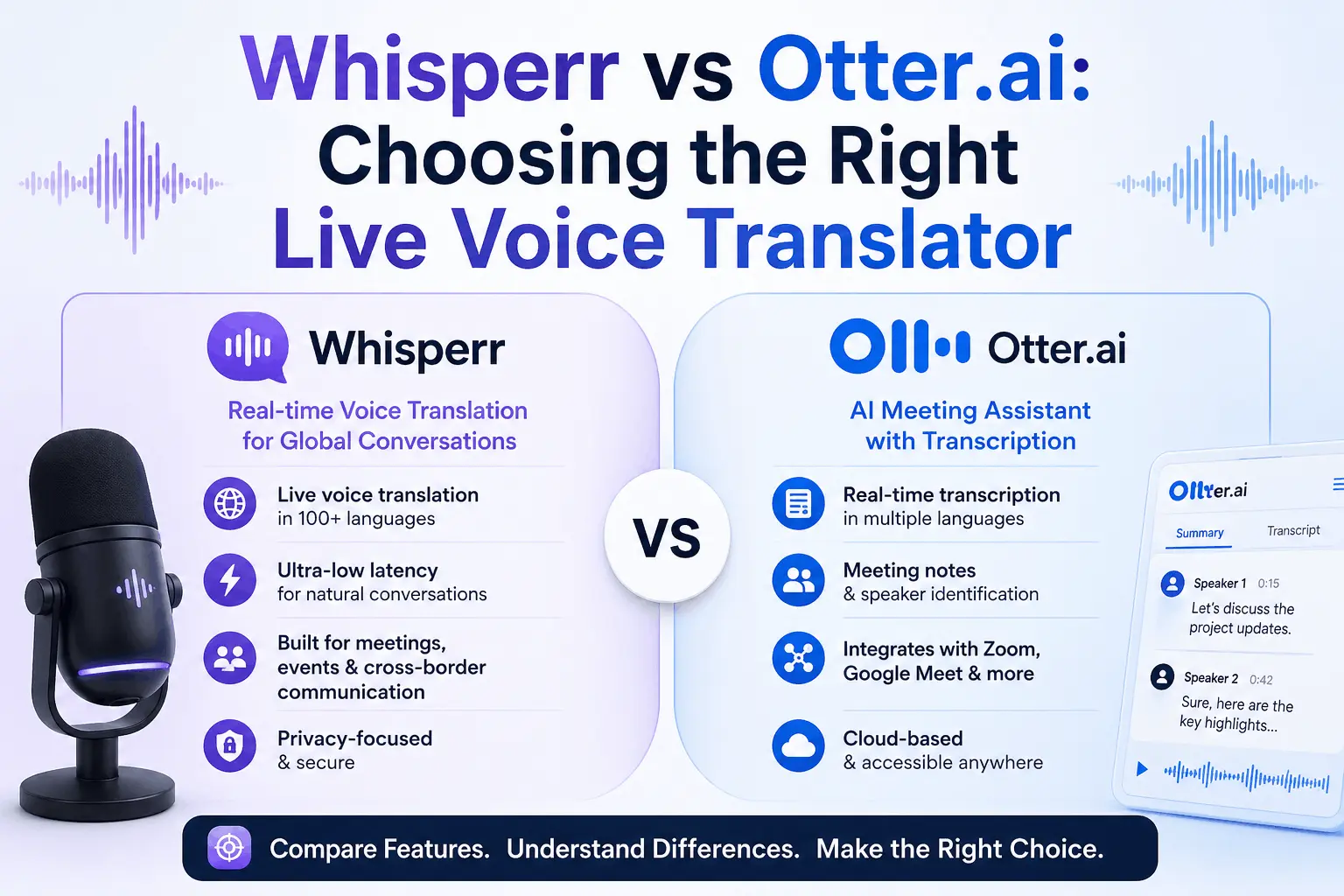
Whisperr vs Otter.ai compared: real-time translation, broadcast mode, unlimited usage. Whisperr is ~60% cheaper. See the full breakdown.