7 Best Translation Earbuds in 2026: Real-Time Translators Compared (and When an App Wins)

Picks by scenario
- You already own a smartphone and earbuds: Whisperr. No hardware to buy, works for meetings and videos too, not just face to face.
- You need translation with zero cellular or wifi signal: a Timekettle device with downloaded offline packs, or Apple's on-device Translate app. Every phone-app translator on this list, Whisperr included, needs a connection.
- You want one device the other person can also use, no app required: Timekettle's earbud sets, where each person wears a bud.
- You already have an iPhone 15 Pro or newer and AirPods: try Apple's free Live Translation first; it may cover your language pair with nothing extra to buy.
- You have a recent Galaxy or Pixel phone: the built-in Interpreter or Live Translate feature is already on your device and free.
- A big group, multiple languages, one room: Timekettle's X1 Interpreter Hub or Whisperr's Broadcast Mode, which shares a room link so listeners pick their own language on a phone they already have.
One note before we start. Whisperr is our product, so weigh the ranking accordingly. Every price and spec below was read from the vendor's own page or support documentation on the date noted next to it, so you can check each one yourself in a couple of minutes.
Do translation earbuds actually work?
Yes, for the specific job they are built for: two people standing close together, taking turns, with normal background noise. Dedicated translator earbuds like Timekettle's use two microphones, one per person, and route each side's speech through a translation model before playing it back in the other bud. For a market stall, a hotel front desk, or a introduction at a conference, that setup works about as well as a phone held between two people, and for some models it works better because each side gets a dedicated mic instead of one phone mic picking up both voices and the surrounding noise.
Where they stop working is anything that is not two people face to face. None of the earbud-first devices on this page can capture a Zoom call, a YouTube video, or a podcast, because their microphones are built to hear the room, not a screen. They also depend on the maker's translation engine and voice model, so accuracy varies by language pair the same way it does for any machine translation, and Bluetooth pairing, firmware updates, and dead batteries are real failure modes that a phone app does not have. If your Timekettle earbuds are giving you trouble, we cover the seven most common causes in [Timekettle not working: 7 common problems, fixes, and when to switch](https://whisperr.co/blog/en/timekettle-not-working-7-common-problems,-fixes-when-to-switch-(2026)).
The full comparison table
Prices and language counts below are vendor-stated and current as of September 17, 2026, pulled from each company's own product page, pricing page, or support documentation. Where a vendor does not publish a number for something, the cell says so instead of guessing.
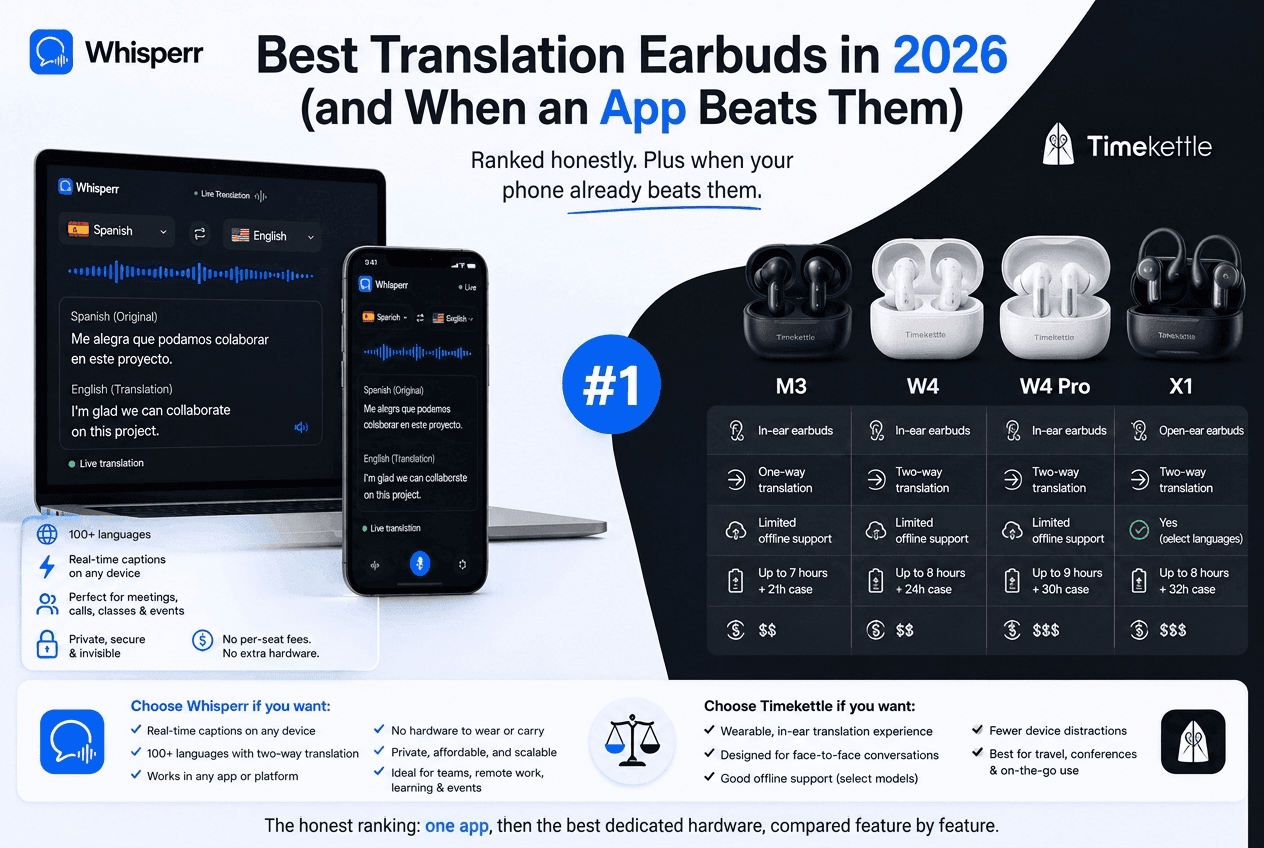
Device | Price (as checked) | Languages (vendor-stated) | Latency claim | Needs a phone app? | Offline? | Subscription? |
|---|---|---|---|---|---|---|
Whisperr (any earbuds) | Free tier; Pro $9.99/week or $84.99/year | 100+ | ~0.2s (spec sheet) | Yes, it is the app | No, needs a connection | Flat fee, unlimited on Pro |
Timekettle W4 Pro | $449.00 | 52, 106 accents | Not published | Yes (Timekettle app) | 13 downloadable packs (2 free with purchase, others ~$10/pair) | None, one-time hardware cost |
Timekettle X1 AI Interpreter Hub | $699.99 (bundles with a cleaning pen or case run to $759.97) | 43, 96 accents; up to 5 languages for 20 people in group mode | Not published | App-free, standalone | One-on-one and Listen & Play modes only | None, one-time hardware cost |
Timekettle M3 | $119.99 (list $149.99) | 43 | Not published | Yes (Timekettle app) | 13 packs, English and Chinese to 7 languages each | None, one-time hardware cost |
AirPods Pro 3 (Live Translation) | $249 MSRP | 9 per Apple's availability page: English (UK, US), French, German, Italian, Japanese, Korean, Mandarin Chinese, Portuguese (Brazil), Spanish (Spain) | Not published | Yes, Apple's Translate app plus an iPhone 15 Pro or later on iOS 26+ | No | None, feature is free |
Galaxy Buds 3 Pro + Samsung Interpreter | List $249, frequently discounted well below that | About 22, per Samsung's own language list | Not published | Requires a Galaxy AI phone (S25/S26 series, Z Fold6/Flip6 or newer) | Common pairs run on-device; less common ones use Samsung Cloud | None, made permanently free in early 2026 |
Pixel Buds Pro 2 + Live Translate | $229 MSRP | 70+, per Google | Not published | Requires Google and Google Translate apps on an Android phone | Google Translate's offline packs cover text; live mode needs a connection | None, feature is free |
Budget Amazon-brand earbuds | Roughly $30 to $60 | Varies wildly, unverified | Not published | Almost always, their own app | Rarely | Usually none, sometimes an app subscription |
A few things stand out. First, Whisperr and the phone-brand features (Apple, Samsung, Google) cost nothing extra if you already own the hardware, while every Timekettle device is a standalone purchase from $120 to nearly $850. Second, not one vendor in this table publishes a latency number, Whisperr included in the sense that ours is a spec-sheet figure rather than an independent lab measurement; treat every number as a claim to verify, not a settled fact. Third, offline support is the one place dedicated hardware genuinely wins: Timekettle's earbuds work with pre-downloaded packs, and Apple's on-device processing is private by design, while Whisperr, Samsung's cloud-routed languages, and Google's Live Translate all need a connection.
A note on budget Amazon-brand earbuds
Search "translation earbuds" on Amazon and you will find dozens of unbranded or house-brand models in the $30 to $60 range, often with screenshots claiming 40, 70, or 130-plus languages. We have not tested any of these devices ourselves, and we are not going to invent a verdict. What we can tell you honestly: these products typically route audio through a generic translation API in a companion app, language counts on the packaging are not independently verified, and return policies and firmware support vary enormously by seller. If you are drawn to this price point mainly because you do not want to spend $249 to $449 on a name-brand device, the free tier of a translation app on the earbuds or wired headset you already own gets you a comparable result for $0, which is the fairer comparison to make before ordering one.
The best translation earbuds in 2026, ranked
1. Whisperr, with the earbuds you already own
Whisperr is not earbuds, it is the app that turns any earbuds already in your ears, wired or Bluetooth, AirPods or a random pair from a drawer, into a live translator. Turn on Speech Mode (called the Interpreter toggle on iPhone, iPad, Mac, and Windows) and Whisperr speaks each finished translation aloud through whatever audio output is active, while the original and translated text both stay on screen. Set your two languages, turn Speech Mode on, and start talking; there is no direction to pick, since translation runs both ways by default.
Standout strengths
- Works with earbuds you already own. There is no compatible-device list to check, because the earbuds are just the audio output your phone or laptop is already using.
- Wearing earbuds actively helps Whisperr work better. Whisperr's own setup guidance flags that spoken output can loop back into the microphone and get re-translated; putting the output on headphones or earbuds instead of a speaker is the fix, not an optional extra.
- Covers meetings, videos, and streams too, not just a face-to-face conversation, because the app captures a browser tab or the microphone, whichever the moment calls for.
- Runs on iOS, Android, Mac, Windows, and the web app, so the same account and the same earbuds work everywhere, unlike a phone-brand feature tied to one ecosystem.
Limitations
- You still need a phone, laptop, or tablet running the app; earbuds alone, with nothing paired to them, do nothing.
- Needs a connection, the same limitation every software option on this page shares except offline-pack hardware.
- Speech Mode speaks each line only once it is finalized, which is not instantaneous mid-sentence the way a dedicated earbud's continuous audio path can feel.
Pricing (as of September 17, 2026): free tier; Pro at $9.99/week or $84.99/year, unlimited transcription and translation on any device.
Best for: anyone who wants translated audio in their ears without buying dedicated hardware, especially if the earbuds need to also handle meetings and video, not just face-to-face conversation.
2. Timekettle W4 Pro
The W4 Pro is Timekettle's flagship, pitched at business use: onsite and online meetings, phone and video call translation, and an AI memo feature that saves the audio and text and exports a summary.
Standout strengths
- Supports 52 languages with 106 accents, the widest language claim of any Timekettle earbud on this page.
- Positioned for business meetings specifically, with phone-call and video-call translation modes, not just face-to-face conversation.
- Open-ear design, so you keep some awareness of the room instead of full isolation.
Limitations
- $449 is a real purchase, and Timekettle does not publish a latency figure to weigh against that price.
- Requires the Timekettle app and a paired phone; it is not a standalone device the way the X1 is.
- Full offline coverage costs extra: two language pairs come free with purchase, and the rest of the 13 offline packs are sold in pairs on top of the device price.
Pricing (checked September 17, 2026, on timekettle.co): $449.00, one color, one-time purchase.
Best for: frequent business travelers who want a dedicated device for onsite and online meetings and are willing to pay for one.
3. Timekettle X1 AI Interpreter Hub
The X1 is not earbuds at all, it is a pocket-sized standalone hub built for group settings: one-on-one simultaneous interpretation, phone-call translation, an "ask and go" handheld mode, and a group meeting mode that Timekettle says handles up to 5 languages for 20 people at once.
Standout strengths
- App-free operation. Unlike the earbud models, the X1 does not require a companion phone app to function.
- Purpose-built for multi-person meetings, which none of the earbud-only options on this page attempt.
- 43 languages with 96 accents, verified on Timekettle's own product page.
Limitations
- $699.99 for the base unit, rising to $759.97 with a cleaning pen and case, is the most expensive device on this page by a wide margin.
- Offline mode is limited to the one-on-one and Listen & Play modes; the flagship group meeting mode needs a connection.
- It is a dedicated device you have to remember to bring and charge, on top of the phone you are already carrying.
Pricing (checked September 17, 2026, on timekettle.co): $699.99 for the X1 alone; $709.98 with a cleaning pen; $759.97 with a cleaning pen and case.
Best for: organizers of small multilingual meetings or events who need one device that does not depend on everyone installing anything.
4. Timekettle M3
The M3 is Timekettle's travel-focused, lower-cost option: a 3-in-1 translator that also plays music and handles phone calls, with active noise reduction and a claimed 25-hour battery life including the charging case.
Standout strengths
- $119.99 is the cheapest device on this page with a published price, and the most accessible entry point into dedicated translator hardware.
- 13 offline language packs cover English and Chinese against Spanish, French, German, Japanese, Korean, and Russian, so a trip with a spotty connection is still covered if you download packs ahead of time.
- Doubles as a regular pair of earbuds for music and calls, so it is not a single-purpose gadget sitting in a drawer between trips.
Limitations
- 43 languages online is narrower than the W4 Pro's 52.
- Like the other Timekettle models, it needs the Timekettle app and a paired phone; it is not standalone like the X1.
- No published latency figure, and no meeting or media-capture mode; it is built for travel conversation, not business calls.
Pricing (checked September 17, 2026, on timekettle.co): $119.99, list price $149.99.
Best for: travelers who want dedicated hands-free earbuds at the lowest Timekettle price point and value offline coverage over top-end language count.
5. AirPods Pro 3 (Live Translation)
Apple's Live Translation feature listens to a face-to-face conversation through your AirPods and shows a translated transcript on your iPhone, with the option to have your side spoken back in the other person's language.
Standout strengths
- Free if you already own a supported iPhone and AirPods; there is no separate purchase beyond the earbuds and phone you likely already have.
- Works across a wider AirPods lineup than just the newest model: Apple's own support page lists AirPods 4 with Active Noise Cancellation, AirPods 5, AirPods Pro 2, AirPods Pro 3, and AirPods Max 2 as compatible, as long as the paired iPhone qualifies.
- Runs through Apple's Translate app, so the same translation engine is available on-screen even without the earbuds in.
Limitations
- Requires an iPhone 15 Pro or later running iOS 26 or later with Apple Intelligence enabled, so older iPhones cannot use it no matter which AirPods you own.
- Language support is limited to the nine languages on Apple's feature availability page (checked October 16, 2026): English, French, German, Italian, Japanese, Korean, Mandarin Chinese, Portuguese (Brazil), and Spanish (Spain). Russian, Hindi, Arabic, Vietnamese and most other languages aren't covered.
- Regional availability varies: Apple notes that some features may not be available in all regions or languages, and earlier Apple documentation excluded people whose device and Apple Account region were both in the EU, so check Apple's availability page for your country.
Pricing (as of September 17, 2026): AirPods Pro 3 list at $249; Live Translation itself is a free software feature, not a separate purchase.
Best for: iPhone 15 Pro-or-newer owners with AirPods who mostly need one of Apple's nine supported languages and want a free, built-in option before buying anything.
6. Galaxy Buds 3 Pro + Samsung Interpreter
Samsung's Interpreter app splits your phone screen into two panels, one per speaker, and can also pipe the translation into compatible Galaxy Buds so you hear it without looking down.
Standout strengths
- Samsung made the core Galaxy AI features, Interpreter included, permanently free in early 2026, so there is no subscription to weigh against the hardware cost.
- Covers about 22 languages according to Samsung's own language list, more than AirPods' launch set.
- Common language pairs process on-device, which is a real privacy advantage over cloud-only approaches.
Limitations
- Requires both a compatible earbud (Buds3, Buds3 Pro, or Buds3 FE per Samsung's support page) and a Galaxy AI phone, meaning the S25 or S26 series, or a Z Fold6/Flip6-class foldable; it does not work on arbitrary Android phones.
- English and Spanish are pre-installed, but every other language is a separate download you have to remember to grab before you need it.
- Samsung's own documentation does not publish a latency figure or a definitive language count beyond the list itself, so treat "about 22" as a floor, not a promise.
Pricing (as of September 17, 2026): Galaxy Buds 3 Pro list at $249 and are frequently discounted well below that; the Interpreter feature itself is free.
Best for: Galaxy S25/S26 or foldable owners who want translation built into the ecosystem they already use, with on-device processing for common pairs.
7. Pixel Buds Pro 2 + Live Translate
Google's Pixel Buds Pro 2 pair with the Google Translate app to run Live Translate: tap the buds to start listening, hear the other person's speech translated near-instantly, and have your own speech played back through the phone in their language.
Standout strengths
- The widest language count in this hardware group: 70-plus, per Google, well ahead of any Timekettle model or AirPods' nine supported languages.
- Free if you already own the hardware, with no separate subscription for the feature.
- Google Translate supports downloadable offline packs for text translation, a fallback the earbud-only Timekettle models do not have in quite the same form.
Limitations
- Needs the latest Google app and Google Translate app installed and up to date on an Android phone; it is not a plug-and-play feature on every Android device by default.
- Live, in-ear translation itself is an online feature; Google's offline downloads cover text translation, not the live conversation mode.
- Like the other phone-brand features here, it is tied to one hardware ecosystem, so it is not useful if the other person's phone, not yours, is the one running the conversation.
Pricing (as of September 17, 2026): Pixel Buds Pro 2 list at $229; Live Translate is a free software feature.
Best for: Pixel or Android owners who want the broadest built-in language coverage of any phone-brand earbud feature, at no extra cost beyond the earbuds.
Translation earbuds for iPhone
If you own an iPhone, you have three real paths, and they are not the same thing. The free path is Apple's own Live Translation with AirPods, covered above, limited to an iPhone 15 Pro or later, iOS 26 or later, and currently nine supported languages. The hardware path is a Timekettle device: the W4 Pro, X1, and M3 all pair with iOS through the Timekettle app, and none of them care which iPhone model you own, so they are the way to get dedicated translator hardware on an older iPhone that cannot run Apple's own feature. The app path is Whisperr for iOS, which needs no dedicated earbuds at all, works on any iPhone that runs a current iOS version, and covers meetings and video in addition to face-to-face conversation, not just the one scenario earbuds are built for. Get it from the App Store.
AirPods language translation: what it can and can't do
Apple's Live Translation is a genuinely useful free feature, and it is worth being precise about its edges so you are not surprised. It can: listen to a face-to-face conversation through compatible AirPods, show a live translated transcript on your iPhone's Dynamic Island and lock screen, and speak your side of the conversation back in the other person's language through the Translate app, all without a subscription. It requires an iPhone 15 Pro or later on iOS 26 or later with Apple Intelligence turned on, so it is invisible on an iPhone 14 or an iPhone 15 base model no matter what AirPods you pair. It does not cover the many languages a full-scale translation app does: as of October 16, 2026, Apple's availability page lists nine (English, French, German, Italian, Japanese, Korean, Mandarin Chinese, Portuguese, and Spanish). It also cannot hear a Zoom call in a browser tab or a video playing on your device the way a screen-capture or tab-capture tool can. Apple says you can use it on a Phone or FaceTime call while wearing your AirPods, but it is designed around in-person conversations and calls, and availability varies by region. If your language pair or your region is not covered yet, that gap is exactly what a cross-platform app like Whisperr or a dedicated device is for. If AirPods translation is not behaving the way you expect on a device it should support, we cover the likely causes in AirPods Live Translation not working well? Here's why, and a better option.
Earbuds vs a translation app
The honest comparison is not earbuds versus no earbuds, it is a single-purpose device versus a general-purpose one. Dedicated translator earbuds and phone-brand features are built around exactly one scenario: two people, close together, talking to each other. An app like Whisperr is built around every scenario audio shows up in: the same conversation, plus a Zoom call, a YouTube video with Floating Subtitles, a lecture, a customer support call, or a livestream, all through the same account on your phone, laptop, or browser. That breadth is the practical reason most people end up better served by an app than a device: you are far more likely to need translation on a screen than in a face-to-face conversation on a given week, and buying $120 to $850 in hardware to cover the smaller slice of that need is a real cost for a narrower job.
Where earbuds keep a genuine edge is offline use and truly hands-free operation. If you are heading somewhere with no usable connection, a Timekettle device with downloaded packs, or Apple's on-device Translate app, keeps working when a cloud app cannot. And if you want both hands and both eyes completely free during a long conversation, simultaneous earbud modes are a different physical experience than glancing at a phone screen, worth paying for if that matters to your specific situation. Outside of those two cases, the phone you are already carrying does the job for free or for a flat subscription fee that costs less than one of these devices in its first year. We compare the two approaches directly in Timekettle alternative: live translation without earbuds, and if you are deciding between an app and Timekettle hardware specifically, [our full head-to-head with the M3, W4, W4 Pro, and X1](https://whisperr.co/blog/en/whisperr-vs-timekettle-earbuds-(m3,-w4,-w4-pro,-x1)-an-honest-2026-comparison) walks through it feature by feature.
When dedicated earbuds are the better choice
We would rather point you to the right tool than sell you the one we make, so here is where translator earbuds are genuinely the better buy. If you know you will be somewhere with no usable data connection for stretches of a trip, a Timekettle device with pre-downloaded offline packs, or Apple's on-device Translate mode, works when a cloud app simply cannot. If the other person you are speaking with does not own a smartphone, or will not install anything, a two-earbud device where you hand over one bud asks nothing of them beyond wearing it for a few minutes. And if you specifically want to keep your hands and eyes completely free during a long, standing conversation, tour, or workshop, the earbud form factor is a real ergonomic advantage over looking at a screen. Outside of those three cases, start with the app you can install in the next two minutes before you spend on hardware built for a narrower job.
Frequently Asked Questions
Do translation earbuds really work as well as advertised?
For their intended job, two people talking face to face, current translator earbuds genuinely work, and Timekettle's are the most established name with the most detailed public specs. Accuracy still varies by language pair the same way it does for any machine translation engine, background noise and overlapping speech remain hard for any device, and none of the vendors in this comparison publish an independently verified latency or accuracy figure, so treat marketing claims, ours included, as claims to check rather than settled facts.
Are AirPods good for language translation?
If you own an iPhone 15 Pro or later on iOS 26 or later, and your language pair is one of the nine Apple supports (English, French, German, Italian, Japanese, Korean, Mandarin Chinese, Portuguese, Spanish), AirPods' Live Translation is a genuinely useful free feature with no separate purchase. Outside that iPhone and language list, and in regions where Apple has not enabled it, it is not available, which is where a Timekettle device or a phone app fills the gap.
What is the best translation earbud for iPhone specifically?
If your iPhone is a 15 Pro or newer on iOS 26 or later and your language pair is covered, Apple's free Live Translation with AirPods is the simplest option with nothing extra to buy. If you have an older iPhone, or need a language outside Apple's current set, any Timekettle model pairs with iOS through the Timekettle app regardless of which iPhone you own.
Do I need special earbuds for Galaxy Buds or Pixel Buds translation to work?
Yes for Samsung: the Interpreter feature requires specific compatible buds (Buds3, Buds3 Pro, or Buds3 FE, per Samsung's support documentation) paired with a Galaxy AI phone such as the S25/S26 series or a recent foldable. Google's Live Translate is tied to the Pixel Buds Pro 2 and an Android phone with current Google and Google Translate apps installed.
Can a translation app replace translator earbuds?
For most day-to-day use, yes, and it covers more ground than dedicated hardware, since an app also handles meetings, videos, and calls that earbud-only devices cannot hear. Dedicated hardware keeps two real advantages: offline use with downloaded language packs, and a fully hands-free experience where each person wears a bud rather than looking at a phone.
How much do translation earbuds cost in 2026?
As checked on September 17, 2026: Timekettle's M3 is $119.99, the W4 Pro is $449.00, and the X1 AI Interpreter Hub starts at $699.99. AirPods Pro 3 list at $249, Galaxy Buds 3 Pro at $249 (often discounted), and Pixel Buds Pro 2 at $229, though for the last three, translation itself is a free feature rather than a separate cost once you own the earbuds and a qualifying phone.
Is there a free way to get translation earbuds functionality?
Yes, in two ways. If you already own a recent iPhone, Galaxy phone, or Pixel phone, the built-in translation features described above cost nothing extra. If you do not, or your phone is not on the qualifying list, an app like Whisperr's free tier turns any earbuds or headset you already own into the audio path for live translation, without buying dedicated hardware at all.
Which offline translation earbuds should I buy for travel with no connection?
Timekettle's devices are the strongest option here: the M3 at $119.99 and the W4 Pro at $449 both support 13 downloadable offline language packs between English or Chinese and major world languages. Apple's on-device Translate app is a free alternative if your language pair is on its list and you do not need dedicated hardware.
How do I use my earbuds for translation?
There are three routes. Dedicated translator earbuds such as Timekettle's pair with the Timekettle app. Phone-brand features use earbuds you may already own: with a supported iPhone and AirPods, start Live Translation from the Translate app (tap Live) or by pressing and holding both stems; Galaxy Buds work with Samsung's Interpreter on a Galaxy AI phone; Pixel Buds work with Google Translate's Live Translate. Or use any earbuds as the audio path for a translation app such as Whisperr: open the app, pick two languages, and tap record. For the AirPods details, see Which AirPods have Live Translation?.
What are the best earbuds with live translation?
For dedicated hardware, the comparison table above covers Timekettle's W4 Pro ($449), M3 ($119.99), and X1 AI Interpreter Hub ($699.99, a standalone hub rather than earbuds), with prices as checked September 17, 2026. For built-in translation you may already own, AirPods Pro 2, Pro 3, AirPods 4 with ANC, AirPods 5, or AirPods Max 2 work with Apple's Live Translation on an iPhone 15 Pro or later, Galaxy Buds 3 Pro with Samsung's Interpreter on a Galaxy AI phone, and Pixel Buds Pro 2 with Google's Live Translate. If you also want translation for meetings and videos, an app on your phone or laptop with any earbuds covers more ground than earbuds alone.
The bottom line
Translation earbuds in 2026 split into two honest categories. Dedicated hardware from Timekettle publishes real prices, from $119.99 to $699.99, and real specs, up to 52 languages and 106 accents on the W4 Pro, with the tradeoff of a device to buy, charge, and pair. Built-in phone features from Apple, Samsung, and Google are free if you already own the qualifying hardware, but each one only works with its own brand's phone, and AirPods' language list in particular is still short of what a dedicated translator or a cross-platform app covers. Before you spend anywhere from $120 to nearly $850, it is worth testing whether the phone and earbuds you already own, running a general-purpose translation app, solve the problem for free. Start with the web app on your next conversation, and if you decide you specifically need offline coverage or a truly hands-free device afterward, the Timekettle ranking above is the honest place to start. For the software side of this comparison, including apps built specifically as live interpreters, see Best Interpreter Apps in 2026.