
Twitch
Twitch Stream ਨੂੰ Real Time ਵਿੱਚ ਅਨੁਵਾਦ ਕਰੋ
Streamers ਨੂੰ ਕਿਸੇ ਵੀ ਭਾਸ਼ਾ ਵਿੱਚ ਸਮਰਥਨ ਦਿਓ। Whisperr Twitch ਵਿੱਚ real-time ਅਨੁਵਾਦ ਕੀਤੇ subtitles ਸ਼ਾਮਿਲ ਕਰਦਾ ਹੈ — 100+ ਭਾਸ਼ਾਵਾਂ, ~0.2s ਲੇਟੈਂਸੀ, stream ਤੋਂ ਸਿੱਧੀ ਸਾਫ਼ audio।
Twitch stream ਨੂੰ ਅਨੁਵਾਦ ਕਰਨ ਦਾ ਤਰੀਕਾ
Twitch browser ਵਿੱਚ ਚਲਦਾ ਹੈ, ਇਸ ਲਈ tab capture ਸਭ ਤੋਂ ਸਾਫ਼ subtitles ਦਿੰਦਾ ਹੈ।
- 1
Browser tab capture (Chrome Extension ਜਾਂ Web App)
Twitch stream ਨੂੰ Chrome tab ਵਿੱਚ ਖੋਲ੍ਹੋ, ਫਿਰ Whisperr Chrome Extension ਜਾਂ Web App ਦੀ ਵਰਤੋਂ ਕਰਕੇ tab audio ਨੂੰ ਸਿੱਧਾ capture ਕਰੋ। Stream ਦੇ ਅਲੰਕਾਰ ਅਨੁਵਾਦ ਕੀਤੇ subtitles ਪੜ੍ਹਣ ਲਈ screen ਨੂੰ split ਕਰੋ।
- 2
Microphone / audio capture
Twitch ਨੂੰ console ਜਾਂ TV ਤੇ ਦੇਖ ਰਹੇ ਹੋ? Whisperr ਨੂੰ ਆਪਣੇ microphone ਦੁਆਰਾ ਸੁਣਨ ਦਿਓ ਅਤੇ real time ਵਿੱਚ ਅਨੁਵਾਦ ਕੀਤੇ subtitles ਦਿਖਾਓ।
- 3
Floating Subtitles on iOS & Android
iPhone ਤੇ Twitch app ਦੇਖ ਰਹੇ ਹੋ? Floating Subtitles ਸਮਰਥ ਕਰੋ ਤਾਂਜੋ ਅਨੁਵਾਦ ਕੀਤੇ captions stream ਤੇ overlay ਹੋਣ।
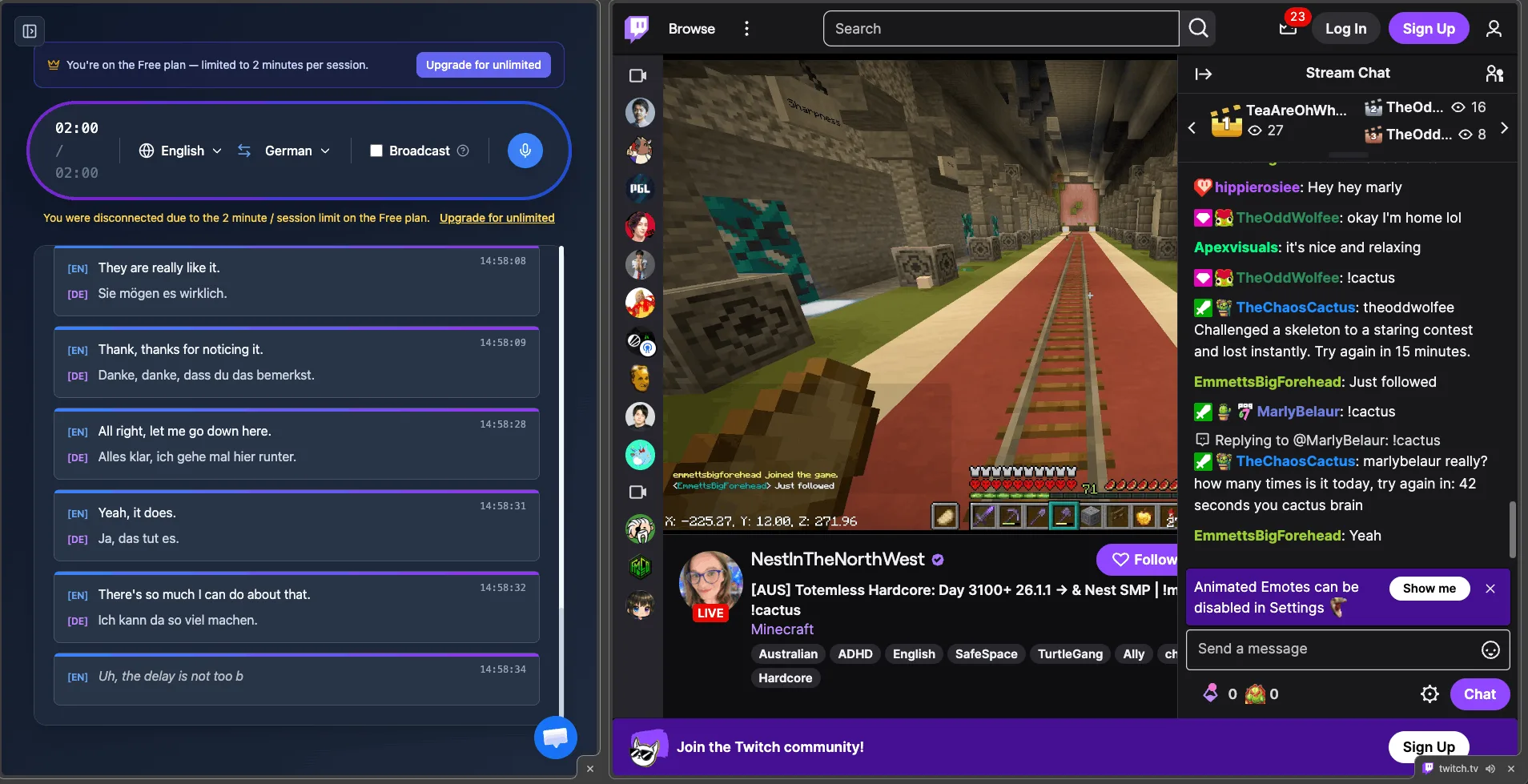
Live video ਲਈ ਬਣਾਇਆ ਗਿਆ
ਕਿਸੇ ਵੀ streamer ਨੂੰ follow ਕਰੋ, live
Real-time subtitles ਤੇਜ਼, unscripted streaming ਲਈ ਬਣਾਏ ਗਏ।
Real-time
Subtitles ਲਗਭਗ 0.2 ਸਕਿੰਟਾਂ ਵਿੱਚ ਪ੍ਰਗਟ ਹੁੰਦੇ ਹਨ ਤਾਂਜੋ live stream ਦੇ ਨਾਲ ਰੱਖਿਆ ਜਾ ਸਕੇ।
Clean tab audio
Chrome ਵਿੱਚ Twitch tab ਨੂੰ capture ਕਰਨ ਨਾਲ background noise ਛੱਡ ਕੇ ਡਿਜ਼ਿਟਲ audio ਮਿਲਦਾ ਹੈ।
100+ ਭਾਸ਼ਾਵਾਂ
Streamers ਨੂੰ ਕਿਸੇ ਵੀ ਭਾਸ਼ਾ ਵਿੱਚ ਪ੍ਰਸਾਰਿਤ ਕਰਦੇ ਦੇਖੋ, long-tail ਵਾਲੀਆਂ ਭਾਸ਼ਾਵਾਂ ਸਮੇਤ।
Live chat-speak ਨੂੰ handle ਕਰਦਾ ਹੈ
Accents, gaming slang, ਅਤੇ background noise ਲਈ ਬਣਾਇਆ ਗਿਆ।
Floating Subtitles on iOS & Android
Twitch mobile app ਦੇ ਦੌਰਾਨ captions ਨੂੰ overlay ਕਰੋ।
Lives & VODs
Live streams ਅਤੇ recorded VODs ਦੋਨਾਂ ਤੇ ਕੰਮ ਕਰਦਾ ਹੈ।
Streamer ਕੀ ਕਹਿੰਦਾ ਹੈ ਇਹ ਕਦੇ ਮਿਸ ਮਤ ਕਰੋ
ਆਪਣੇ ਅਗਲੇ Twitch stream ਨੂੰ 100+ ਭਾਸ਼ਾਵਾਂ ਵਿੱਚ real-time subtitles ਸ਼ਾਮਿਲ ਕਰੋ — ਮੁਫ਼ਤ ਵਿੱਚ ਅਜ਼ਮਾਓ।
ਮੁਫ਼ਤ ਵਿੱਚ ਅਨੁਵਾਦ ਕਰਨਾ ਸ਼ੁਰੂ ਕਰੋTwitch ਅਨੁਵਾਦ FAQ
ਕੀ ਮੈਂ Twitch stream ਨੂੰ real time ਵਿੱਚ ਅਨੁਵਾਦ ਕਰ ਸਕਦਾ ਹਾਂ?+
ਇਸ ਨੂੰ ਕਰਨ ਦਾ ਸਭ ਤੋਂ ਸਹੀ ਤਰੀਕਾ ਕਿਹੜਾ ਹੈ?+
ਕੀ ਇਹ live streams ਅਤੇ VODs ਤੇ ਕੰਮ ਕਰਦਾ ਹੈ?+
ਕਿਹੜੀਆਂ ਭਾਸ਼ਾਵਾਂ ਸਮਰਥਿਤ ਹਨ?+
ਕੀ ਮੈਂ ਆਪਣੇ ਫ਼ੋਨ ਤੇ ਦੇਖ ਸਕਦਾ ਹਾਂ?+
ਕੀ ਇਹ ਮੁਫ਼ਤ ਹੈ?+
ਕਿਸੇ ਵੀ streamer ਨੂੰ ਆਪਣੀ ਭਾਸ਼ਾ ਵਿੱਚ ਦੇਖਣ ਲਈ ਤਿਆਰ ਹੋ?
Twitch ਤੇ real-time ਅਨੁਵਾਦ ਕੀਤੇ subtitles ਦੇ ਨਾਲ ਭਾਸ਼ਾ ਦੀ ਰੁਕਾਵਟ ਨੂੰ ਭੰਗ ਕਰੋ।
ਮੁਫ਼ਤ ਵਿੱਚ ਸ਼ੁਰੂ ਕਰੋ