
OBS & Streaming
Live Translated Captions in OBS — One Browser Source
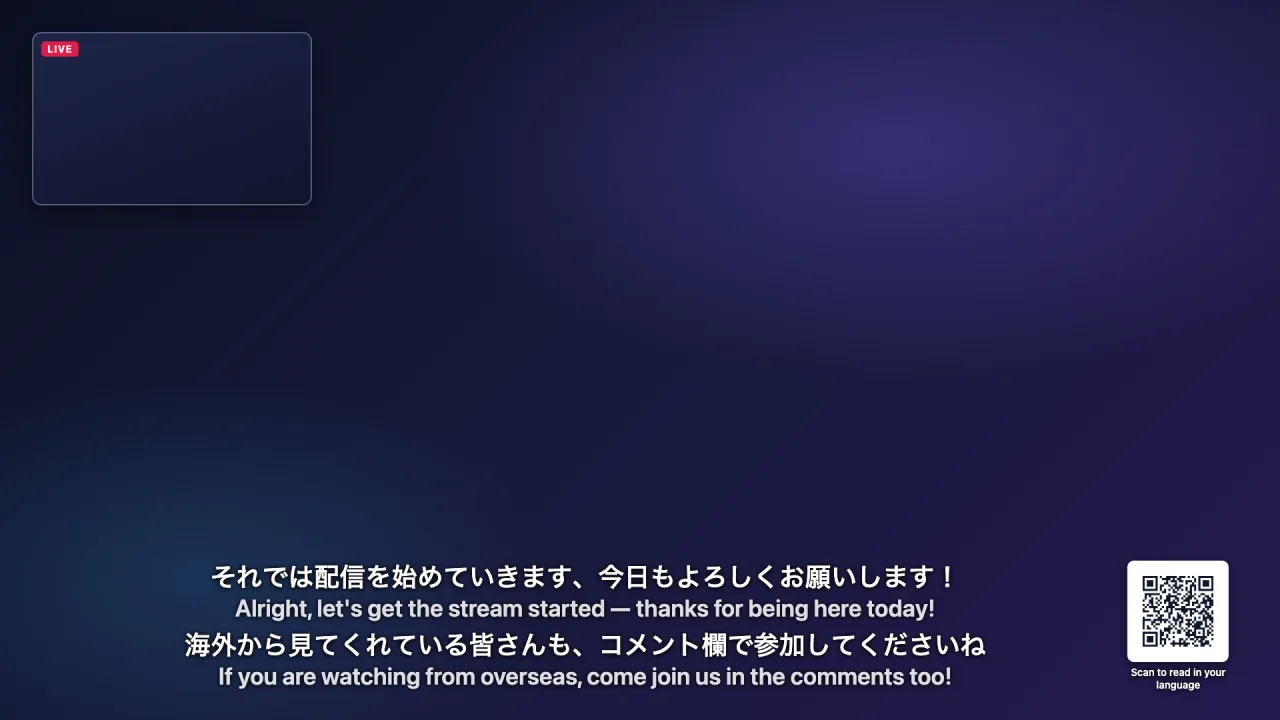
Give your stream real-time subtitles your international viewers can actually read. Whisperr turns your speech into live translated captions and serves them as a transparent browser source URL — paste it into OBS and you are live. No plugin, no GPU load, 100+ languages.
Features of OBS
Everything runs in a browser tab. Whisperr turns your speech into live translated captions for your stream — and hands every viewer a way to read in their own language.
- 1
Real-time transcription & translation
Speak in your language and the overlay shows live captions translated into English — or any of 100+ languages — in about 0.2 seconds, composited straight onto your stream through an OBS browser source.
- 2
A QR code for every viewer’s language
The overlay parks a small QR code in the corner of your stream. Viewers scan it and follow along on their phone in whatever language they prefer — the burned-in captions stay in one language, the room covers all the others.
- 3
Very simple
No plugin, no model download, no GPU cost. All you need is a browser tab that picks up your microphone — Whisperr handles the rest in the cloud, and OBS just renders a URL.
What users say
Whisperr review
“I love how easy Whisperr is to use and how it accurately understands and translates text and speech across different languages. It's so effective that even in scenarios where other tools might fail, Whisperr performs perfectly. Additionally, the ability to select languages for translation directly on a phone is fantastic. This feature helps us translate church services, ensuring everyone understands without missing anything important. The initial setup was straightforward, making it smooth to start using immediately.”
Fast Translations and a Clear, Easy-to-Read Layout
“It translated really fast, and the way the text appears on the screen—with its clear layout—is very easy to read.”
Whisperr Delivers Lightning-Fast, Highly Accurate Real-Time Translation
“The translation is extremely fast and accurate; after comparing several programs, I consider Whisperr to be the fastest and most accurate real-time translation app.”
Top-Notch Speech Recognition and Flashcard-Style Translations for Fast Study
“Whisperr's speech recognition and translation quality are both top-notch, and better than similar tools I've tried so far. Beyond that, as a Japanese learner, I especially like how Whisperr displays each sentence and its translation almost like flashcards, with a text-to-speech button for each one. That setup makes studying feel fast and efficient, and it's easy to review sentence by sentence.”
Simple Real-Time Translation for Work
“I like best about Whisperr is that it feels simple and straightforward to use.”
Awesome
“This is very useful, extremely user-friendly, easy to use, and the recognition capability is very precise, with very fast speed. It should be the most accurate and fastest translation I've used so far.”
Easy to use
“Whisperr is easy to get started and no hassle at all. A great tool to learn languages and for travelling.”
Exceptional outcomes
“I attempted English to Hindi translation and achieved highly accurate results.”
Amazing
“Using it for Spanish to English and it’s amazing!”
Worth hundreds of thousands of yen
“The same performance as other conversation translation apps. Those charge by the minute, but this one is apparently a one-time purchase, so the value for money is outstanding. Compared with about five similar apps, this one is the best on both performance and price. I wonder whether it was made by a Japanese developer??”
Translated from Japanese
Built for live streaming
Captions that keep up with a live stream
Translation runs in the cloud, so the machine that renders your game keeps every frame it has.
No GPU cost to you
Speech recognition and translation run on Whisperr servers, not on your streaming PC — unlike OBS plugins that run a local AI model beside your game.
100+ languages
Caption your stream in the languages your audience actually speaks, including ones no platform auto-caption covers.
Any streaming software
A browser source is a standard feature — OBS Studio, Streamlabs, StreamElements and others all render the same URL.
Transparent by default
The overlay ships with a transparent background, so only the caption text composites onto your scene. Add a backing tint if you want one.
Any platform you stream to
Captions are burned into your video, so they reach Twitch, YouTube Live, Kick, TikTok Live and everywhere else at once.
Style it in the URL
Font size, color, line count, alignment and hold time are query parameters — OBS only gives you a URL field, so every control lives in the URL.
Overlay URL options
Append these to your overlay URL to restyle the captions. All are optional — the bare /overlay/<roomId> URL is already a working lower third.
Example: https://whisperr.co/app/overlay/ab12cd34?mode=both&size=36&lines=3&align=top gives you a three-line overlay at the top of the screen showing the original language above each translation.
You do not have to hand-edit any of this: the setup page at whisperr.co/app/overlay/<roomId>/choose builds the URL for you.
| Parameter | What it does | Default |
|---|---|---|
| mode | translation, transcription, or both (original above the translation) | translation |
| size | Caption font size in pixels, 12–120 | 42 |
| lines | How many recent lines stay on screen, 1–6 | 2 |
| color | Text color as a hex value, e.g. color=%23ffcc00 | #ffffff |
| bg | Backing panel opacity from 0 (transparent) to 1 (solid) | 0 |
| hold | Seconds a finished line stays before it fades, 1–60 | 8 |
| align | top or bottom of the browser source | bottom |
| lang | Show only one target language when the room has several | all |
| qr | Corner QR code linking to your room, where a viewer picks their own caption language on their phone; qr=0 hides it | on |
| qrsize | Edge length of the QR code in pixels, 64–400 | 132 |
| qrpos | Which corner the code sits in: br, bl, tr or tl | br |
| qrlabel | Caption under the code; qrlabel= with no value shows the bare code | Scan to read in your language |
Whisperr vs the other ways to caption a stream
Three approaches, three different costs. Verified August 2026.
| Platform auto-captions | Local AI caption plugin | Whisperr overlay | |
|---|---|---|---|
| Translates into other languages | Rarely, and only from a few source languages | Depends on the model you load | Yes — 100+ languages |
| Runs on your streaming PC | No | Yes — competes with your game for GPU/CPU | No — runs in the cloud |
| Works on every platform you stream to | No — per-platform feature | Yes | Yes |
| Setup | Toggle in platform settings | Install plugin, download model, tune | Paste one URL |
| Viewers need to do anything | Turn captions on | No | No |
When Whisperr is not the right choice
Whisperr captions live speech in real time, so it needs a live internet connection on the streaming machine. If you stream from a location with no reliable upstream bandwidth, a local OBS caption plugin will hold up better — it runs entirely offline, at the cost of GPU headroom and translation quality.
If you only ever need English captions of English speech for an English audience, your platform’s built-in auto-captions are free and adequate. Whisperr earns its place the moment you want a second language on screen — that is where auto-captions stop and 100+ languages start.
For scripted, pre-recorded video, a subtitle editor gives you frame-accurate control that no live system can match. Whisperr is built for the unscripted half of streaming: talking, reacting, and taking chat questions live.
Stream to viewers who do not speak your language
Real-time translated captions in your OBS scene, in 100+ languages — free to try.
Start Streaming FreeOBS caption translation FAQ
What is an OBS browser source?+
Do I need to install an OBS plugin?+
Will this slow down my stream or my game?+
Does it work in Streamlabs or StreamElements?+
Can I show the original language and the translation at the same time?+
Can I caption game audio and my guests, not just my microphone?+
Which languages can I caption my stream in?+
How much does it cost?+
What is the QR code in the corner of the overlay?+
Ready to caption your stream in 100+ languages?
One browser source is all it takes to make your stream readable worldwide.
Get Started Free