
TV & Movies
Translate Foreign TV Shows & Movies in Real Time
K-dramas, anime, foreign films, live TV — Whisperr translates the audio live in 100+ languages, so you can watch anything without waiting for subtitles. ~0.2s latency.
- 1
Open a foreign-language show or film on YouTube
Any show, film or trailer on YouTube, in the new tab. Leave it paused for now.
- 2
Pick your languages
Set the spoken language of the video and the language you want to read. Tab capture is already selected.
- 3
Press Record, then pick that tab
Choose the YouTube tab in the picker, tick Share tab audio, and press play. Translated subtitles appear here as the actors speak.
- 4
Pop the subtitles out over the video
Opens the subtitles in a small window that stays on top, so you can watch in the other tab and still read along.
When the tab picker opens, tick Share tab audio — without it there is no sound to translate.
Netflix, Prime Video and other protected players block browser tab capture. On Mac or Windows, choose System audio in the Whisperr desktop app instead. It captures TV apps and anything else playing on the computer.
How to translate foreign TV and movies
Works across streaming services, live TV, and downloaded files.
- 1
Floating subtitles on iOS & Android
Open the Whisperr iOS or Android app, enable Floating Subtitles, then switch to any streaming app. Captions float over the video while it plays.
- 2
System audio on Mac or Windows
The Whisperr desktop app captures your computer’s system audio directly — the most flexible option, since it works no matter which app, browser, or player the show is in.
- 3
Browser tab capture (Chrome Extension or Web App)
On a computer where you can’t install the desktop app, play the show in a Chrome tab and capture the tab audio with the Whisperr Chrome Extension or Web App. Split the screen to read translated subtitles beside it.
- 4
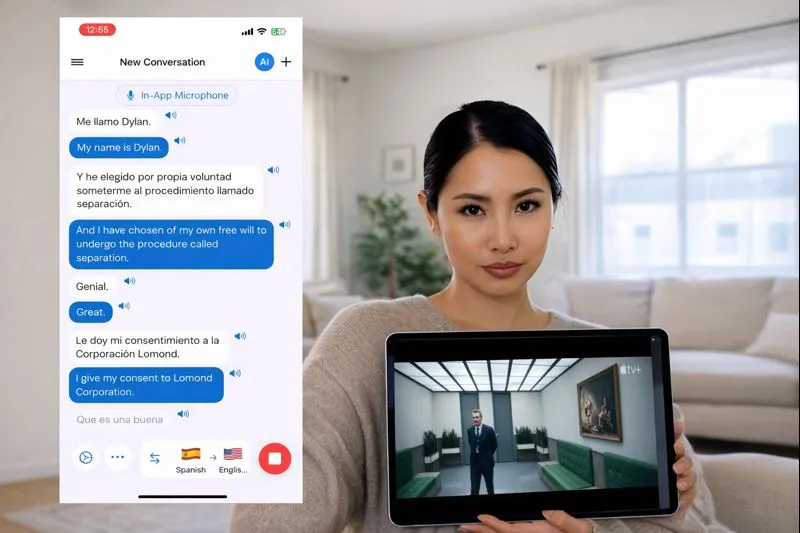
Microphone / audio capture (live TV)
Watching on a TV or projector? Let Whisperr listen through your microphone and show translated subtitles in real time on your phone.
Watch any live video — translated
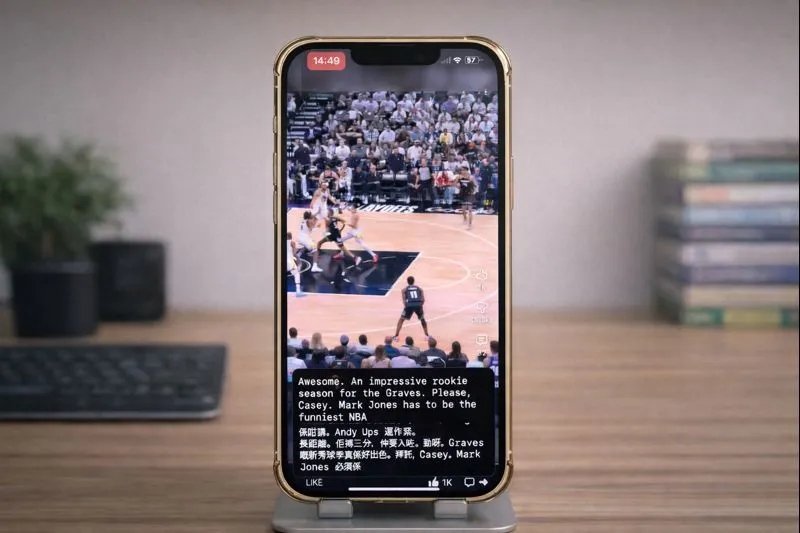
YouTube Live, TikTok Live, Twitch, Kick, Discord and more: follow any stream in your own language, with Floating Subtitles on top of what you're watching.
- Turn on Floating Subtitles and the translation floats on top of whatever app you're watching
- Whisperr listens through the microphone — turn Echo Cancellation off to translate audio playing on the same phone
- Works on iPhone and Android
Simple to start
All you need is a phone or a computer.
- 1
Open Whisperr
Use the web app in your browser, or the iPhone, Android, Mac or Windows app.
- 2
Pick your languages and audio
Choose the language being spoken and the one to translate into, then use your microphone — or the audio playing on your computer.
- 3
Just listen, or just speak
Translations appear as people talk. To share them, send the room link or show the QR code.
Whisperr is available everywhere
Use it in your browser, or download the app for your phone or computer.


Keep your transcripts — where you want them
Save transcriptions and translations to come back to later, either in your Whisperr account or only on your own device.
Web app
Save to Cloud
Turn on Save to Cloud and each conversation is stored in your Whisperr account, so you can reopen it from Recent Conversations on any device you sign in on. Turn it off and nothing is kept.
iPhone & Android
Stored on your phone
Transcripts are saved locally on your phone and never uploaded to the cloud. Delete any conversation whenever you want.
Mac & Windows
Stored on your computer
The desktop app keeps your conversation history on your computer, without sending it to the cloud.
Privacy first
Whisperr translates your conversations without keeping them.
Audio is never stored
Your audio is processed in real time to produce the transcript and translation, then discarded.
Nothing saved unless you choose
Transcripts and translations are not stored on our servers unless you turn on Save to Cloud.
Never used to train AI
Your audio, transcripts and translations are never used to train AI models, and our service providers can't use them either.
Encrypted in transit
Everything between your device and Whisperr is encrypted with TLS 1.2 or higher.
Supported languages
Languages
62 languages
Afrikaans · Albanian · Arabic · Azerbaijani · Basque · Belarusian · Bangla · Bosnian · Bulgarian · Catalan · Simplified Chinese · Traditional Chinese · Cantonese · Croatian · Czech · Danish · Dutch · English · Estonian · Finnish · French · Galician · German · Greek · Gujarati · Hebrew · Hindi · Hungarian · Indonesian · Italian · Japanese · Kannada · Kazakh · Korean · Latvian · Lithuanian · Macedonian · Malay · Malayalam · Marathi · Norwegian · Persian · Polish · Portuguese · Punjabi · Romanian · Russian · Serbian · Slovak · Slovenian · Spanish · Swahili · Swedish · Tagalog · Tamil · Telugu · Thai · Turkish · Ukrainian · Urdu · Vietnamese · Welsh
Speak in any of them, translate into any of them
On the web app. The Mac and Windows apps currently offer 61 (all except Cantonese), and the Android app 48.
What users say
Whisperr review
“I love how easy Whisperr is to use and how it accurately understands and translates text and speech across different languages. It's so effective that even in scenarios where other tools might fail, Whisperr performs perfectly. Additionally, the ability to select languages for translation directly on a phone is fantastic. This feature helps us translate church services, ensuring everyone understands without missing anything important. The initial setup was straightforward, making it smooth to start using immediately.”
Fast Translations and a Clear, Easy-to-Read Layout
“It translated really fast, and the way the text appears on the screen—with its clear layout—is very easy to read.”
Whisperr Delivers Lightning-Fast, Highly Accurate Real-Time Translation
“The translation is extremely fast and accurate; after comparing several programs, I consider Whisperr to be the fastest and most accurate real-time translation app.”
Top-Notch Speech Recognition and Flashcard-Style Translations for Fast Study
“Whisperr's speech recognition and translation quality are both top-notch, and better than similar tools I've tried so far. Beyond that, as a Japanese learner, I especially like how Whisperr displays each sentence and its translation almost like flashcards, with a text-to-speech button for each one. That setup makes studying feel fast and efficient, and it's easy to review sentence by sentence.”
Simple Real-Time Translation for Work
“I like best about Whisperr is that it feels simple and straightforward to use.”
Awesome
“This is very useful, extremely user-friendly, easy to use, and the recognition capability is very precise, with very fast speed. It should be the most accurate and fastest translation I've used so far.”
Easy to use
“Whisperr is easy to get started and no hassle at all. A great tool to learn languages and for travelling.”
Exceptional outcomes
“I attempted English to Hindi translation and achieved highly accurate results.”
Amazing
“Using it for Spanish to English and it’s amazing!”
Worth hundreds of thousands of yen
“The same performance as other conversation translation apps. Those charge by the minute, but this one is apparently a one-time purchase, so the value for money is outstanding. Compared with about five similar apps, this one is the best on both performance and price. I wonder whether it was made by a Japanese developer??”
Translated from Japanese
Built for entertainment
Watch anything from anywhere
Real-time translation of the actual audio, on any source.
100+ languages
K-dramas, anime, telenovelas, foreign films — follow content in any language.
Any source
Streaming services, live TV, downloaded files, or a cinema — if you can hear it, Whisperr can translate it.
Real-time
Subtitles appear in about 0.2 seconds and stay in sync.
Floating subtitles
On iOS and Android, captions overlay whatever app you watch in.
Best on desktop
The Mac and Windows apps capture system audio directly, no browser tab required. Tab capture is there for a computer where you can’t install the desktop app.
Handles dialogue & accents
Built for fast dialogue, dialects, and noisy scenes.
Watch anything, no matter the language
Add real-time translation to your next show in 100+ languages — free to try.
Start Translating FreeForeign TV & movies translation FAQ
Can I translate a foreign movie or show in real time?+
Does it work when there are no subtitles available?+
Which services does it work with?+
Is it good for K-dramas and anime?+
Which languages are supported?+
Is it free?+
Ready to watch anything in your language?
Break the language barrier on any screen with real-time translation.
Get Started Free