
Meetings Without an Interpreter
Live Meeting Translation Without an Interpreter
Run one Whisperr session for the meeting, paste a link in the chat, and every attendee follows along in the language they pick — on screen or read aloud. It works alongside Zoom, Microsoft Teams, Google Meet, Webex and in-person meetings, with nothing to schedule and no interpreter to book.
How to translate a meeting without an interpreter
One person runs Whisperr for everyone. Attendees only need the link.
- 1
Capture the meeting audio
If the meeting runs in a Chrome tab, open the Whisperr Web App in a second tab, choose Mic + Screen and share the meeting tab with its audio. If it runs in the Zoom, Teams or Webex desktop app, use the Whisperr app for Mac or Windows with System audio.
- 2
Share the room link in the chat
Set the language the meeting is held in, turn on Share Link in the Web App (Broadcast in the desktop app) and press record. Paste the room link into the meeting chat — or, in the Web App, show its QR code on screen.
- 3
Each attendee picks a language
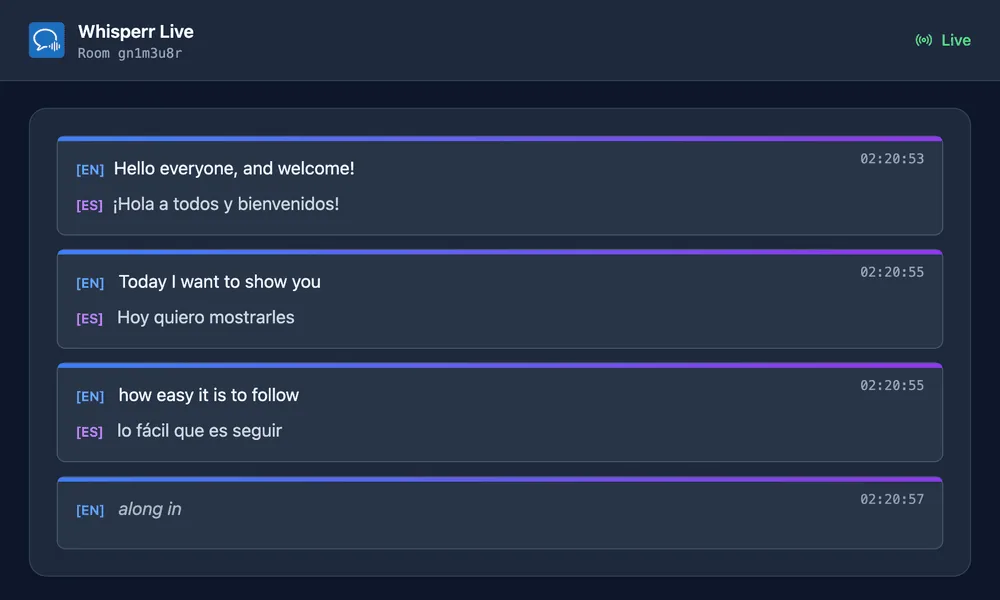
Attendees open the link in any browser — no app, no account — and choose their language from the Translation language menu. They read each line as it is spoken, or tap Speech mode to hear it.
What users say
Whisperr review
“I love how easy Whisperr is to use and how it accurately understands and translates text and speech across different languages. It's so effective that even in scenarios where other tools might fail, Whisperr performs perfectly. Additionally, the ability to select languages for translation directly on a phone is fantastic. This feature helps us translate church services, ensuring everyone understands without missing anything important. The initial setup was straightforward, making it smooth to start using immediately.”
Fast Translations and a Clear, Easy-to-Read Layout
“It translated really fast, and the way the text appears on the screen—with its clear layout—is very easy to read.”
Whisperr Delivers Lightning-Fast, Highly Accurate Real-Time Translation
“The translation is extremely fast and accurate; after comparing several programs, I consider Whisperr to be the fastest and most accurate real-time translation app.”
Top-Notch Speech Recognition and Flashcard-Style Translations for Fast Study
“Whisperr's speech recognition and translation quality are both top-notch, and better than similar tools I've tried so far. Beyond that, as a Japanese learner, I especially like how Whisperr displays each sentence and its translation almost like flashcards, with a text-to-speech button for each one. That setup makes studying feel fast and efficient, and it's easy to review sentence by sentence.”
Simple Real-Time Translation for Work
“I like best about Whisperr is that it feels simple and straightforward to use.”
Awesome
“This is very useful, extremely user-friendly, easy to use, and the recognition capability is very precise, with very fast speed. It should be the most accurate and fastest translation I've used so far.”
Easy to use
“Whisperr is easy to get started and no hassle at all. A great tool to learn languages and for travelling.”
Exceptional outcomes
“I attempted English to Hindi translation and achieved highly accurate results.”
Amazing
“Using it for Spanish to English and it’s amazing!”
Worth hundreds of thousands of yen
“The same performance as other conversation translation apps. Those charge by the minute, but this one is apparently a one-time purchase, so the value for money is outstanding. Compared with about five similar apps, this one is the best on both performance and price. I wonder whether it was made by a Japanese developer??”
Translated from Japanese
Built for business meetings
What an interpreter booking was for, without the booking
The meeting runs as normal. Whisperr sits beside it and gives every attendee their own language.
Each attendee picks a language
The room opens in the language you set, and anyone can switch to another of 60+ in the Translation language menu. Their choice changes only what they see, never what anyone else reads.
Read it or hear it
Speech mode reads each translated line aloud on the attendee’s own device, in the voice and at the speed they choose. Everyone else can simply read.
Works with any meeting app
Whisperr works from the audio your computer is already playing, so it runs alongside Zoom, Microsoft Teams, Google Meet or Webex on any plan — no marketplace app, no admin approval, no bot joining the call.
Nothing to schedule
No interpreter to book days ahead. Start a session five minutes before the call, or halfway through when someone joins who needs another language.
Bilingual meetings, both ways
When a meeting runs in two languages, set both with the ⇄ arrow. Whisperr follows whoever is speaking in either one, and attendees can still pick a third.
No recordings kept
Meeting audio is processed in real time and never stored. Transcripts are saved only if you turn on Save to Cloud, and nothing is used to train AI models.
Which setup fits your meeting
Pick the row that matches where the meeting is running.
System audio carries what the computer plays — everyone else on the call, but not the person sitting at that computer. To include your own voice too, use Mic + Screen in the Web App, or run the session from a spare laptop that joins the call just to listen.
| Your meeting | Run Whisperr on | Audio source |
|---|---|---|
| Google Meet, or Zoom or Teams in a Chrome tab | The Whisperr Web App, in a second Chrome tab | Mic + Screen, sharing the meeting tab with its audio |
| Zoom, Teams or Webex desktop app | The Whisperr app on the same Mac or Windows PC | System audio |
| A meeting room or in-person meeting | A phone, tablet or laptop on the table | Microphone |
Whisperr vs a human interpreter vs built-in meeting translation
Three ways to run a multilingual meeting, and where each one fits.
Built-in translation is worth checking first if your organization already pays for it. Microsoft Teams, for example, keeps translated captions behind a Teams Premium or Microsoft 365 Copilot license, and its Interpreter agent is tied to per-person Copilot licenses. Whisperr needs neither, and works the same way in every meeting app.
| Compared on | Whisperr | Human interpreter | Built-in meeting translation |
|---|---|---|---|
| Booking | None — start any time | Scheduled in advance | None once the license is in place |
| What attendees get | Live text in their own language, or read aloud | A spoken interpretation | Translated captions, and spoken interpretation on some plans |
| Languages | Each attendee picks from 60+ | One interpreter per language pair | Set by the platform and the plan |
| Meeting apps | Any, plus in-person meetings | Any | Only inside that platform |
| Pricing | Flat per-seat fee, no hourly meter | Paid by the hour or the day | An add-on license on eligible plans |
| Best for | Everyday meetings, client calls, training | Legal, medical and high-stakes negotiations | Organizations already paying for the license |
When you still need a human interpreter
Whisperr is machine translation, not certified interpretation. Where the law or your organization requires a qualified interpreter — medical consent, court and legal proceedings, sign language, or a negotiation where one mistranslated figure costs real money — book one.
A conference running in a dozen languages at once is a different job too. One Whisperr room carries the translation you set plus up to five more languages that attendees add, which covers most meetings; beyond that, an event platform sold to organizers may fit better.
For everything else — the weekly sync with an overseas team, the supplier call, the onboarding session, the customer demo — nobody has to book anything. Start a session, share the link, and the meeting starts on time.
What it costs
Only the person running the session needs a seat. Attendees join free, with no account.
Whisperr for teams is $29 per user per month, or $120 per user per year billed annually. Every seat includes unlimited sessions of up to three hours each, with no hourly meter, so a long meeting costs the same as a short one.
You can try it on the Free plan first. It limits session length, which is enough to test your setup before a real meeting.
Your next meeting can start on time
No interpreter to book. Share one link and let every attendee choose their language.
Start Translating FreeMeeting translation without an interpreter: FAQ
How can I translate a meeting without an interpreter?+
Does it work with Zoom, Microsoft Teams, Google Meet and Webex?+
Can each attendee choose a different language?+
Do attendees need to install anything or pay?+
What if the meeting is held in two languages?+
Can attendees listen instead of reading?+
Can Whisperr replace a professional interpreter?+
How much does it cost for a team?+
Ready for your next multilingual meeting?
One link, every attendee in their own language. Start free.
Get Started Free