
Timekettle alternative
A Timekettle Alternative With No Device to Buy
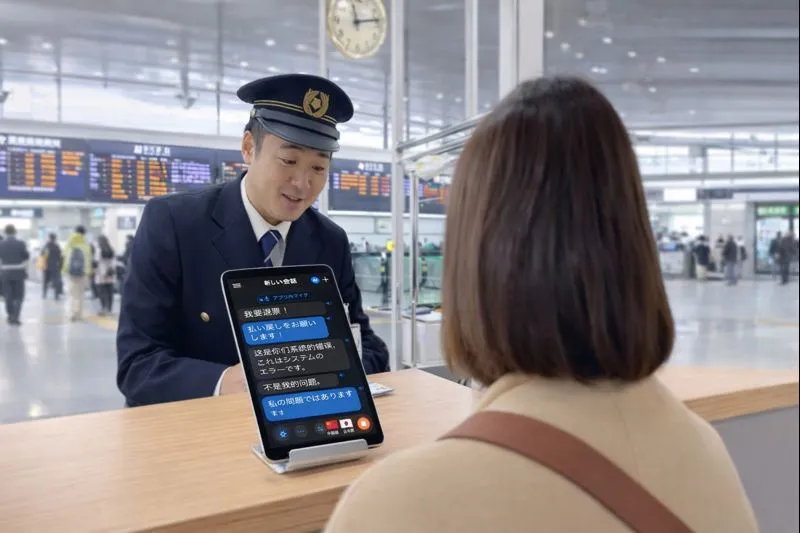
Timekettle sells translator hardware — the W4 Pro and W4 earbuds, the M3 travel buds, the T1 handheld, the X1 meeting hub. Whisperr does the same live two-way translation on the phone or laptop already in your pocket: 100+ languages, about 0.2 seconds, nothing to charge or pair.
- 1
Pick your source
Microphone for in-person talk, or a browser tab / system audio for a call, video, or anything else playing sound.
- 2
Set your languages
Choose the language being spoken and the one you want to read or hear back.
- 3
Press Record and go
Speak, or press play on whatever you’re capturing — the translation appears here live, in about 0.2 seconds.
If you pick a tab or screen, tick Share tab audio or Share system audio in the picker — without it there is no sound to translate.
App versus dedicated translator hardware
Timekettle does not publish prices on the product pages we checked, so no price is quoted here rather than guessed. Device names and the T1’s advertised offline language packs were read from Timekettle’s own site on August 20, 2026.
| Whisperr (app) | Timekettle (hardware) | |
|---|---|---|
| Up-front cost | None — free tier, then a flat annual plan | Buy the device (W4 Pro, W4, M3, T1, X1 or WT2 Edge) |
| Runs on | The phone or laptop you already own | Its own earbuds, handheld or meeting hub |
| Charging and pairing | None | Charge the buds and case; pair before use |
| Other person has to wear a bud | No | Depends on the mode and model |
| Works for online meetings and video | Yes — system audio on Mac/Windows, tab capture on the web, for Zoom, Teams, Meet, YouTube and more | Some models add phone-call and online-meeting modes |
| Offline use | No — needs a connection | The T1 handheld ships offline language packs (44 advertised) |
| Reading the translation | On-screen captions and floating subtitles | Primarily audio, with screens on the handheld models |
| Group listening | Broadcast Mode room link, no app for listeners | X1 hub is built for multi-person meetings |
| If it breaks or is lost | Re-download and sign in | Replace the hardware |
When a Timekettle device is the better choice
Offline is the honest one. If you will be somewhere with no usable connection — a remote trip, a flight, a region where roaming is not worth it — a handheld with offline language packs keeps working and a cloud app does not. Timekettle advertises 44 offline packs on the T1, and that is a real advantage a phone app cannot match.
Hands-free is the other. Simultaneous earbud modes, where each person wears a bud and both keep their hands and eyes free, are a genuinely different experience from looking at a screen — worth it for long conversations, walking tours, or working alongside someone.
Everywhere else, the phone you already own does the job with nothing to buy, and it is the same tool for your online meetings and the videos you watch. If you have a Timekettle device that is giving you trouble, the troubleshooting guide below is a better first stop than a repurchase.
Replacing translator earbuds with an app
The device you need is the one you are already carrying.
- 1
Install Whisperr on your phone or laptop
iOS, Android, Mac, Windows, or the web app. There is no pairing step, no firmware update, no case to charge, and nothing extra to remember when you leave the house.
- 2
Put it between you and the other person
Microphone capture picks up both sides of a face-to-face conversation. Whisperr auto-detects both languages and translates in both directions, so neither person has to wear anything or hand a bud over.
- 3
Read it, or hear it
Show the translated captions on screen, or turn on Speech Mode so the phone speaks each translation aloud. For a group, Broadcast Mode gives everyone a room link and their own language, with no app and no account.

What users say
Whisperr review
“I love how easy Whisperr is to use and how it accurately understands and translates text and speech across different languages. It's so effective that even in scenarios where other tools might fail, Whisperr performs perfectly. Additionally, the ability to select languages for translation directly on a phone is fantastic. This feature helps us translate church services, ensuring everyone understands without missing anything important. The initial setup was straightforward, making it smooth to start using immediately.”
Fast Translations and a Clear, Easy-to-Read Layout
“It translated really fast, and the way the text appears on the screen—with its clear layout—is very easy to read.”
Whisperr Delivers Lightning-Fast, Highly Accurate Real-Time Translation
“The translation is extremely fast and accurate; after comparing several programs, I consider Whisperr to be the fastest and most accurate real-time translation app.”
Top-Notch Speech Recognition and Flashcard-Style Translations for Fast Study
“Whisperr's speech recognition and translation quality are both top-notch, and better than similar tools I've tried so far. Beyond that, as a Japanese learner, I especially like how Whisperr displays each sentence and its translation almost like flashcards, with a text-to-speech button for each one. That setup makes studying feel fast and efficient, and it's easy to review sentence by sentence.”
Simple Real-Time Translation for Work
“I like best about Whisperr is that it feels simple and straightforward to use.”
Awesome
“This is very useful, extremely user-friendly, easy to use, and the recognition capability is very precise, with very fast speed. It should be the most accurate and fastest translation I've used so far.”
Easy to use
“Whisperr is easy to get started and no hassle at all. A great tool to learn languages and for travelling.”
Exceptional outcomes
“I attempted English to Hindi translation and achieved highly accurate results.”
Amazing
“Using it for Spanish to English and it’s amazing!”
Worth hundreds of thousands of yen
“The same performance as other conversation translation apps. Those charge by the minute, but this one is apparently a one-time purchase, so the value for money is outstanding. Compared with about five similar apps, this one is the best on both performance and price. I wonder whether it was made by a Japanese developer??”
Translated from Japanese
What an app changes
No hardware, no rituals
Most of what people dislike about translator earbuds is logistics rather than translation quality.
Nothing to charge or pair
No dead earbud at the moment you need it, no Bluetooth handshake in a noisy street, no case left on the hotel nightstand.
Nobody has to wear anything
Earbud translation often means handing a bud to a stranger. A phone on the table between you asks nothing of the other person.
The same tool online and in person
The device that translates your market conversation also translates your Zoom call, your YouTube video and your doctor’s appointment — hardware built for face-to-face does not follow you onto a browser tab.
You can read it, not just hear it
Captions on screen and floating subtitles over any app mean names, numbers and addresses can be read back rather than guessed at from audio.
100+ languages, no packs to manage
Language coverage is server-side, so there is nothing to download per language and nothing to plan before a trip.
Nothing to lose or replace
A lost app is a re-download. Lost or broken hardware is a repurchase, and a translator you cannot use until it arrives.
Try it before you buy hardware
Whisperr is free to start on the phone already in your pocket.
Start Translating FreeTimekettle alternative FAQ
Is there a Timekettle alternative that does not need hardware?+
Is an app as good as translator earbuds?+
Does Whisperr work offline?+
Does the other person need the app?+
How much does it cost compared with buying a device?+
My Timekettle earbuds are not working — is switching the answer?+
The best translator is the one you have on you
Start free on the device you are already carrying.
Get Started Free